
Managing your subscription
Plans, choosing and changing a plan, payment methods, subscription invoices and cancellation.
Last updated:
Three plans
BakePilot has three plans matched to the size of the bakery. Prices are net, and 23% VAT is added to each. With yearly billing the monthly price is 20% lower.
- Podstawowy (Starter) - 98 PLN net/month (78 PLN with yearly billing), up to 2 users: orders, products, retail customers, calendar, order kanban, notes, ingredient database
- Profesjonalny (Professional) - 189 PLN net/month (151 PLN yearly), up to 5 users: additionally the recipe calculator with sub-recipes, inventory, the purchase planner and shopping list, reports, analytics, B2B customers, the delivery sheet with route planning, delivery notes (WZ), the cake configurator, quotes and contracts, product labels, public API
- Mistrzowski (Master) - 319 PLN net/month (255 PLN yearly), unlimited users: additionally production from a recipe, invoices with KSeF (Poland's National e-Invoicing System), the invoice price scanner, HACCP, time tracking, finance, stocktaking and expiry dates, recurring orders, crate tracking, the production list, priority support
Tip: The user limit is the number of active accounts including the owner's account. In Settings, in the “Employees” section, above the “Add employee” button you see a counter, e.g. “Accounts: 2 of 5”, and the icon next to it explains what is counted. Deactivated accounts and Time tracking employees who only clock in on the tablet are not counted. During the trial period there is no limit. Once the limit is reached, the “Add employee” button is inactive, and next to it you see “Account limit of the … plan reached.” and the link “See higher plans”; accounts you already have keep working, also after moving to a lower plan. Details in the article “Inviting your team”.
Choosing and changing a plan
The plan is managed by the Administrator. In Settings, next to the “Plan” field, there is a “Manage plan” button that opens a page with the current plan and the dates “Active since” and “Paid until” (during the trial period: “Trial period until”). From there, “Change plan” leads to the page “Choose a plan for your bakery”. Card payment takes place on a secure Stripe page.
- In Settings click “Manage plan”, then “Change plan” (during the trial period, “Choose plan”)
- Choose “Monthly” or “Yearly” billing (-20%) and the “Net” or “Gross” price view
- If you have a promo code, enter it in the “Have a promo code?” field - before choosing a plan
- An account without a NIP (Polish tax identification number) ticks the statement “I request that the service begin before the 14-day period for withdrawing from the contract expires…” - without it the payment will not open
- Click “Choose plan” under the plan you are interested in
- On the Stripe page, enter your card and invoice details, then pay
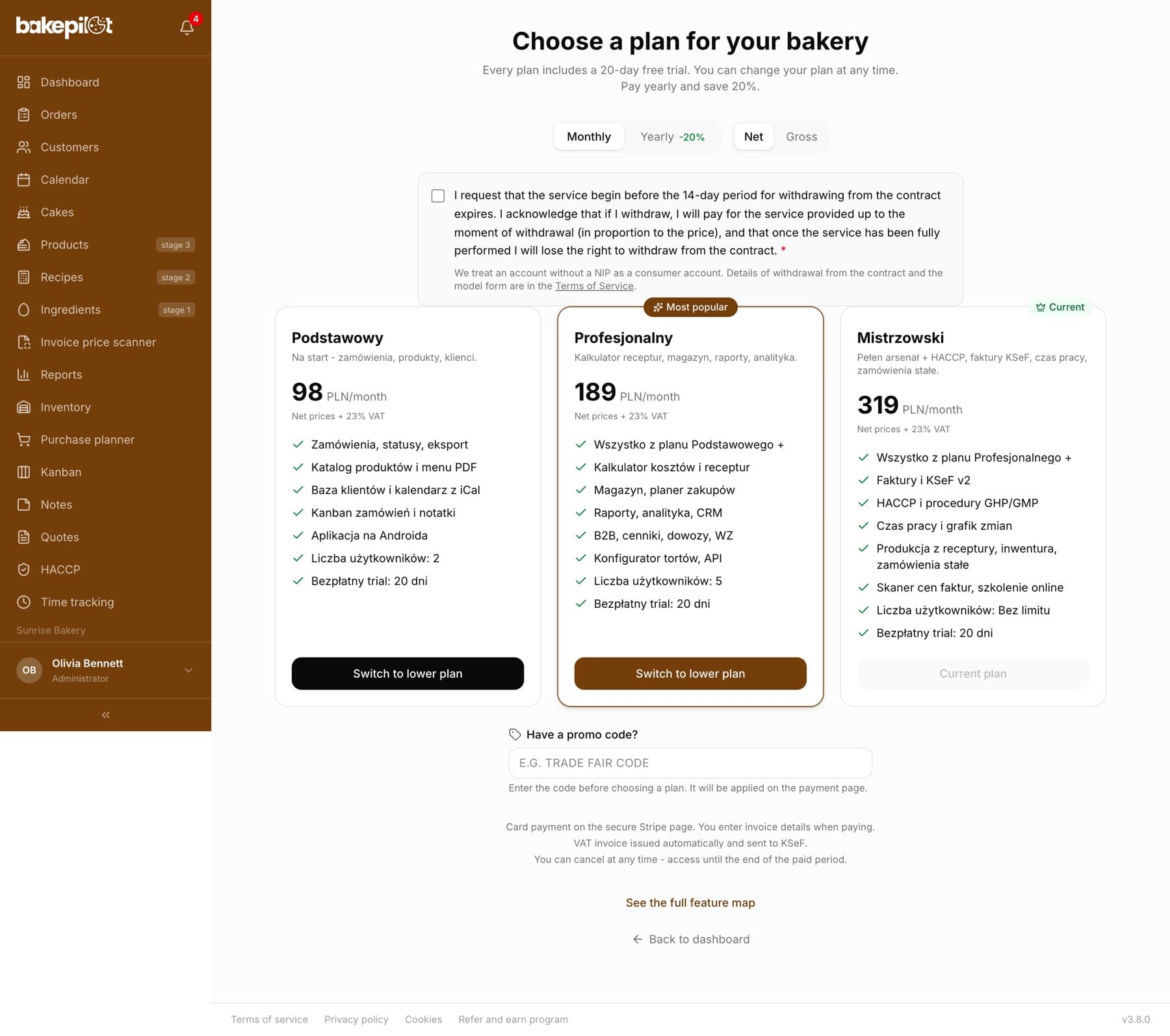
Tip: Not sure which plan? The link “See the full feature map” below the plan cards expands a table with every feature and the plan in which it is available. The same table is in the pricing section of our website.
Payment method, invoices and cancellation
You buy a plan on the “Choose a plan” page - the “Choose plan” button opens a secure Stripe page where you enter your card and invoice details (when buying for a company, tick “I'm purchasing as a business” and enter the name and NIP). After payment you return to the “Manage plan” page, and the plan is activated within a few seconds. A “Subscription” section with a “Manage subscription” button and an “Invoices” list appear on that page. The button opens the subscription settings, where you can change your card, plan and invoice details, or cancel. A VAT invoice for each payment is issued automatically, sent to KSeF and delivered by e-mail as a PDF.
- Card payment on a secure Stripe page - the card is charged automatically every month or every year
- You enter a promo code in the “Have a promo code?” field on the “Choose a plan” page, before choosing a plan
- A VAT invoice is issued automatically after each payment - the e-mail with the PDF arrives after the KSeF number is assigned, usually within a few to several minutes
- An upgrade to a higher plan takes effect immediately, with an extra charge for the rest of the period
- Cancel at any time - access until the end of the paid period (the “Paid until” date)
- The “Manage plan” page and the subscription settings are available only to the Administrator
Plans paid other than by card, and the end of the paid period
If your plan is not paid by card through Stripe (e.g. you pay by bank transfer against an invoice, or we set up your plan manually), on the “Manage plan” page instead of the “Subscription” section you see a “Payments and invoices” section with the address kontakt@bakepilot.pl. In that case you request a plan change, a change of invoice details or a cancellation by e-mail - we will handle it on the same business day.
- The date until which the plan is paid is shown in the “Paid until” field on the “Manage plan” page
- 7 days and 1 day before that date we send a reminder to the company e-mail address from the settings, with a link to the “Choose a plan” page
- After that date, without another payment, access to the app is blocked - you can only open Settings, “Manage plan” and the “Choose a plan” page, where you see the message “Your plan has ended”
- Your data stays in the account; once the plan is paid (by card through “Choose a plan” or by a bank transfer that we book), everything comes back immediately
- A plan paid by card through Stripe renews automatically with each payment
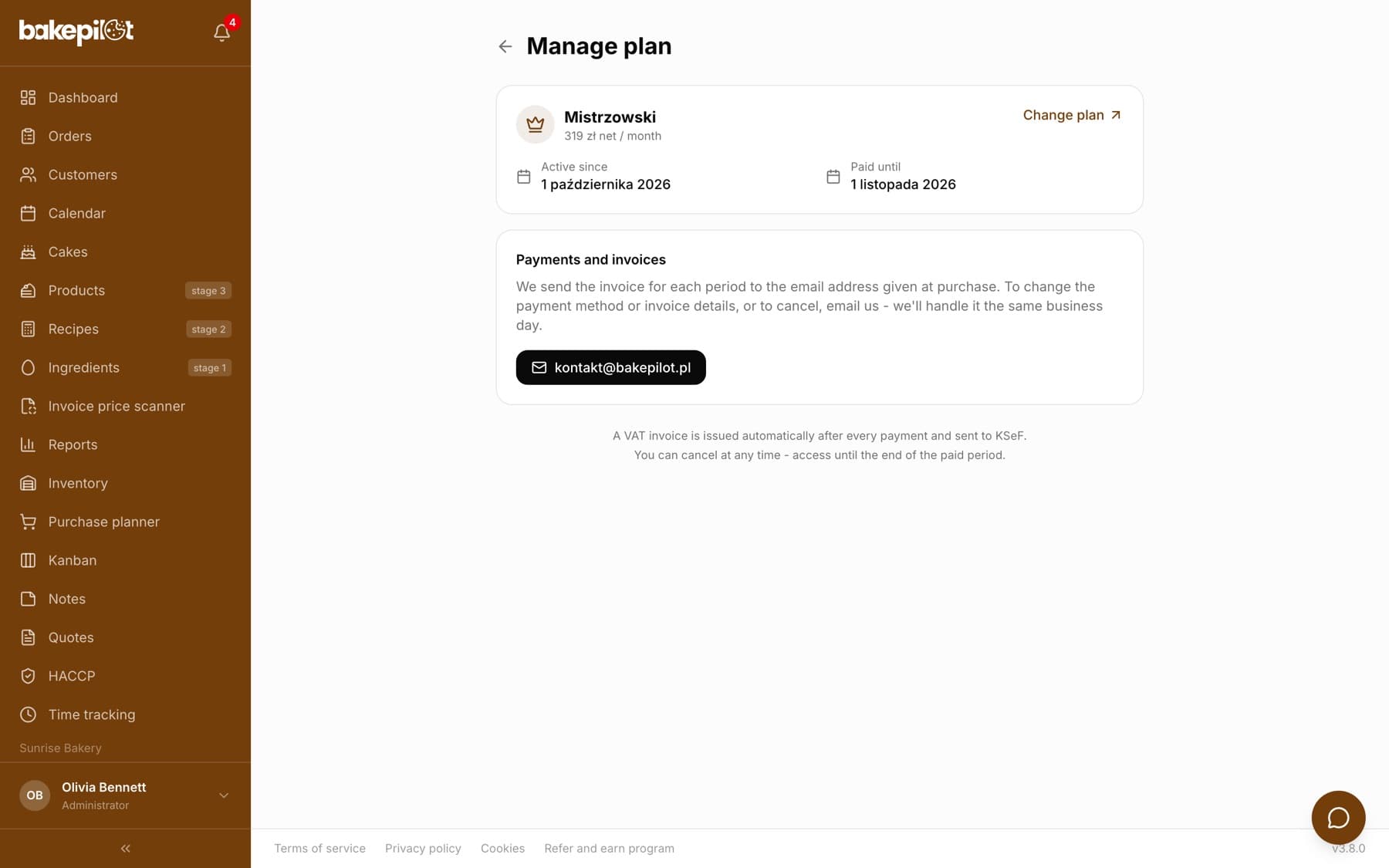
Tip: Is the end of your paid period approaching and you pay by bank transfer? Write to kontakt@bakepilot.pl before the “Paid until” date, or switch to card payment through “Choose a plan” - then the plan renews itself.
Frequently asked questions
Can I cancel my subscription?
Yes, at any time - on the “Manage plan” page click “Manage subscription” and choose to cancel. Access remains until the end of the paid period. After that the account switches to limited mode, and the data stays (from 2 November 2026, for 6 months - you can download it with a full export). After that time we delete the account, notifying you by e-mail 30 and 7 days in advance.
Which payment methods are accepted?
Card payment on a secure Stripe page. BakePilot does not store card details.
Do I have to enter a card during the trial period?
No. You enter a card only when choosing a plan - at the latest after the 20-day trial period ends.
Can I try one feature from a higher plan without changing my plan?
Yes, after talking to us. At your request we can open a selected feature from a higher plan for a set period, e.g. the ordering portal for wholesale customers in the Profesjonalny (Professional) plan. Your plan and payment do not change, and employee permissions work as usual. On the “Manage plan” page, below the plan card, you then see the line “… on trial until” with the end date. After that date the feature again requires a higher plan, and whatever you saved in it stays in the account. Write to kontakt@bakepilot.pl.