
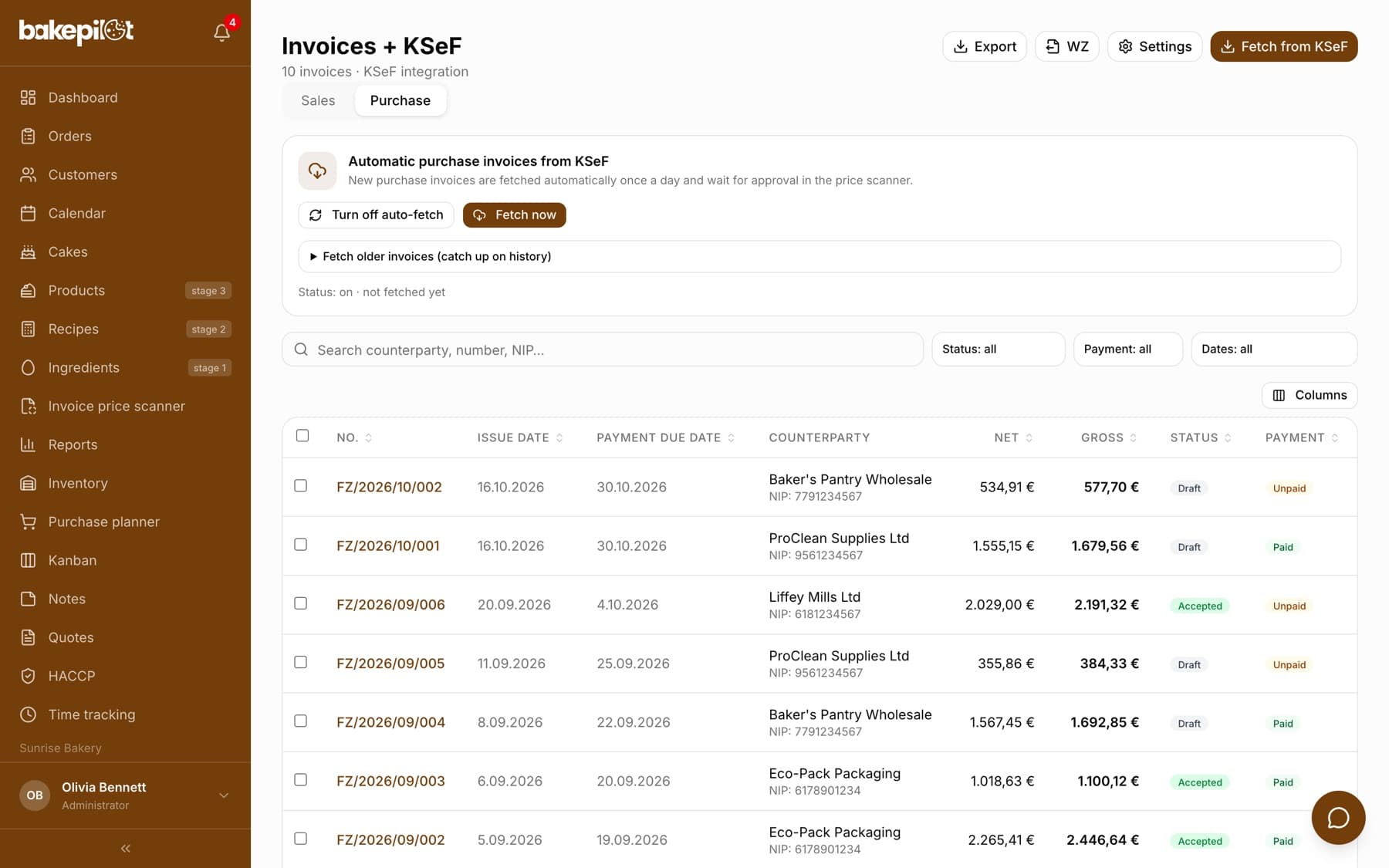
Automatic purchase invoices from KSeF
Invoices from wholesalers arrive in the app by themselves and feed the price scanner.
Last updated:
No more photographing invoices
Large wholesalers - Makro, Selgros, Polmarkus and others - issue invoices directly to KSeF (Poland's National e-Invoicing System). BakePilot fetches them automatically and plugs them into the price scanner you already know. You do not need to take photos or upload anything, and the data is exactly what the supplier issued - with no risk of a wrong reading from a blurry photo.
- Invoices fetched automatically once a day, in the morning
- Lines with barcodes and prices after discounts
- No reading costs, because the data comes straight from the document
- Feature available in the Mistrzowski (Master) plan
Tip: There is only one requirement: KSeF must be connected. If you do not have it yet, see the article on the KSeF integration - the certificate takes a dozen or so minutes to get with the free Profil Zaufany (the Polish government's free online identity).
How it works day to day
A fetched invoice does not change anything by itself. It goes to the price scanner as a ready preview: you see which ingredients went up and which went down in price, and you accept the changes exactly as when scanning a photo. You always have the final say.
- The invoice appears in the “Scan history” as a preview of price changes
- The old and new price side by side for every line
- You accept, correct or skip lines
- After you click “Apply changes”, recipe costs are recalculated automatically
Fetching on demand
Don't want to wait for the morning fetch? The “Fetch now” button downloads invoices straight away. One manual fetch covers up to 15 invoices - this limit comes from KSeF's limits, not from the app. If more are waiting, the rest will be picked up by the automatic morning fetch or the next click.
- Open “Invoices” and go to the “Purchase” tab
- In the “Automatic purchase invoices from KSeF” panel, click “Fetch now”
- Read the “Fetching from KSeF finished” message - it gives the number of new, checked and skipped invoices
- Approve the new documents in the “Invoice price scanner”
Tip: There is a gap of about 15 minutes between fetches. Clicking the button too early shows the message “The previous fetch was a moment ago. Please try again in a few minutes.” with information on how many minutes to wait.
Catching up on history
The first fetch goes back 30 days. If you want older invoices in the app, expand “Fetch older invoices (catch up on history)”, pick a date in the “From” field and click “Fetch from this date”. The same limit of 15 invoices per click applies, so you pull in a longer history in several rounds.
- The “From” field - the start date for catching up
- “Fetch from this date” - fetching within the 15-invoice limit
- Invoices already saved in the app are skipped, no duplicates are created
The switch and the last fetch
You can turn automatic fetching on or off at any time with the “Turn on auto-fetch” / “Turn off auto-fetch” button. Below the buttons you see the line “Status: on · last fetched …” with the date and time - so you know straight away whether everything works.
- Switch for automatic fetching
- Date and time of the last run
- Error information if the last connection failed
Where the invoice came from
In the “Scan history”, documents fetched from KSeF are marked “KSeF” next to the supplier's name. Documents from a photo or an uploaded file have no such mark. This makes it easy to see which prices come straight from a structured invoice and which come from a reading that is worth checking.
- The “KSeF” mark - data straight from the issuer's document
- No mark - a photo or a file, data from a reading
Suppliers outside KSeF
Not every supplier issues invoices to KSeF - a local mill, a fruit seller at the market or a foreign wholesaler will still give you paper. For them the photo scanner works as before: it reads the lines and the VAT summary, and the document goes to the same purchase register.
- “Take a photo” and “Upload a document” in the Invoice price scanner
- Reading of VAT amounts in addition to line prices
- Both sources shown together on the “Purchase” tab
Frequently asked questions
Do I need KSeF to use this?
Yes. We fetch purchase invoices from KSeF, so the company must have a certificate or token connected. Setup takes a dozen or so minutes and does not require a paid signature - the free Profil Zaufany is enough.
Will ingredient prices change by themselves?
No. A fetched invoice appears as a proposal of changes in the price scanner. Only your click on “Apply changes” updates ingredient prices and recipe costs.
Why were only 15 invoices fetched?
One manual fetch covers up to 15 invoices - this limit comes from KSeF's limits. The remaining documents will be picked up by the automatic morning fetch or another click after about 15 minutes.
Which plan includes this feature?
The Mistrzowski (Master) plan, together with the invoice price scanner and the Finance module. The fetching panel is visible to people with the “Fetch purchase invoices” permission, and the scanner to people with the “Invoice price scanner” permission (by default the Administrator and the Accountant).