
Feature · Deliveries
Your whole delivery route planned in a few clicks.
You select the orders for delivery, the system arranges the optimal order of stops and opens the whole route in Google Maps. The driver gets a sheet with addresses, times and amounts to collect.
Available from the Podstawowy (Starter) plan - from 98 PLN/month + VAT.
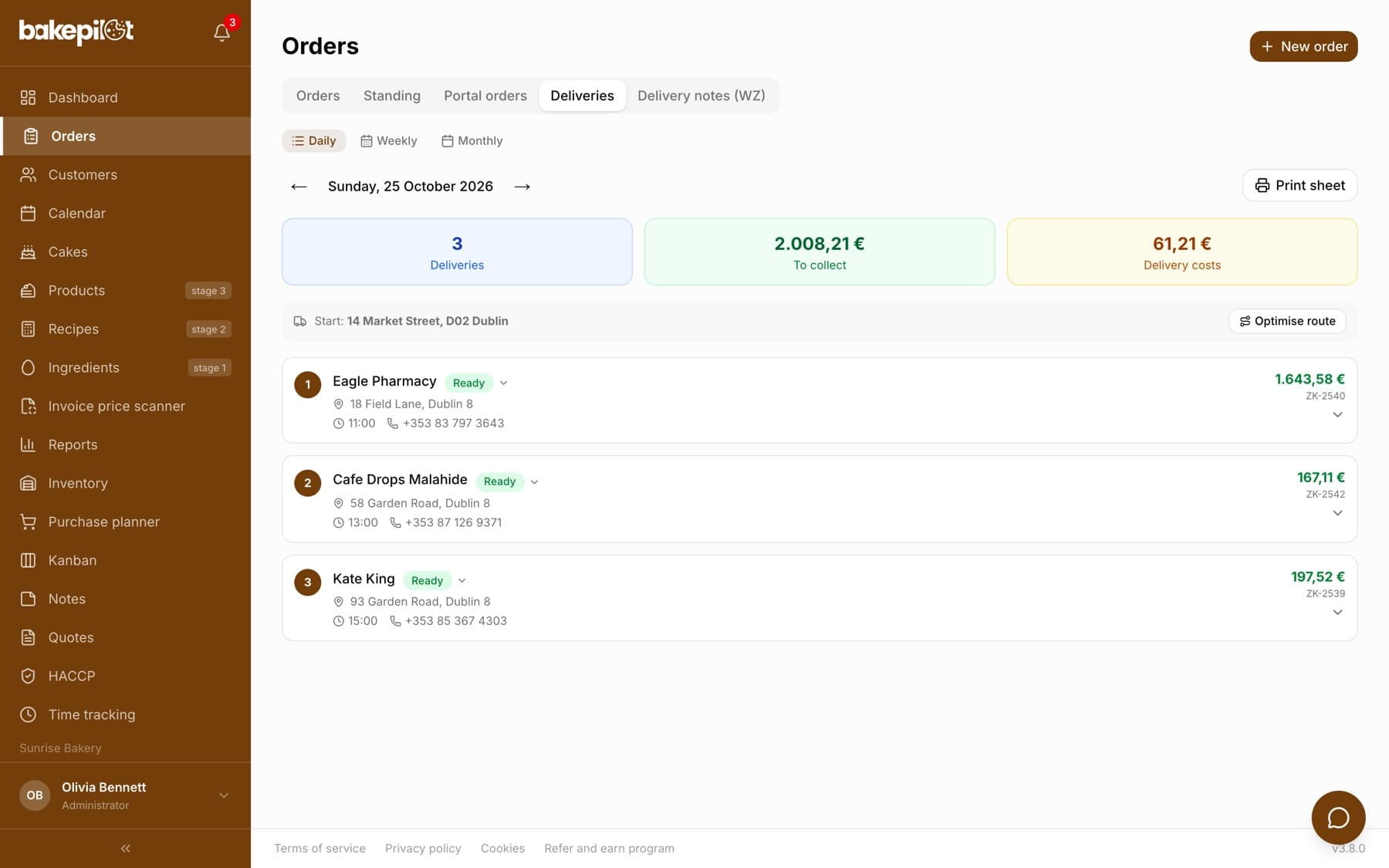
Today's delivery list
The Deliveries module shows all orders with a delivery address for the selected day. For each one you see the customer, the address, the agreed time, the products and the amount to collect. You tick the orders that go into one route, and off you go.
- Orders with a delivery address in one view
- Filter by delivery date
- Select which orders go into the route
- Delivery time agreed with the customer on every order
- Total of the amounts to collect
Optimized stop order
With one click the system arranges the delivery order: it starts from your bakery's address and sorts the stops so that the route is as short as possible.
- Automatic route planning from the bakery's address
- Numbered order of stops
- The planned route stays in place after a delivery status changes
The whole route in Google Maps, with no stop limit
After optimizing, you click Open in Google Maps and the whole route - starting at the bakery, with all addresses in the set order - opens in navigation on the driver's phone. Long routes too: Google Maps normally shows at most 9 waypoints, but BakePilot works around this limit and passes on every stop.
- One click, every stop in navigation
- No 9-stop limit, even a dozen or more deliveries on the map
- Order matches the optimized route
- Works on the driver's phone, no extra apps
Driver sheet and statuses straight from the delivery card
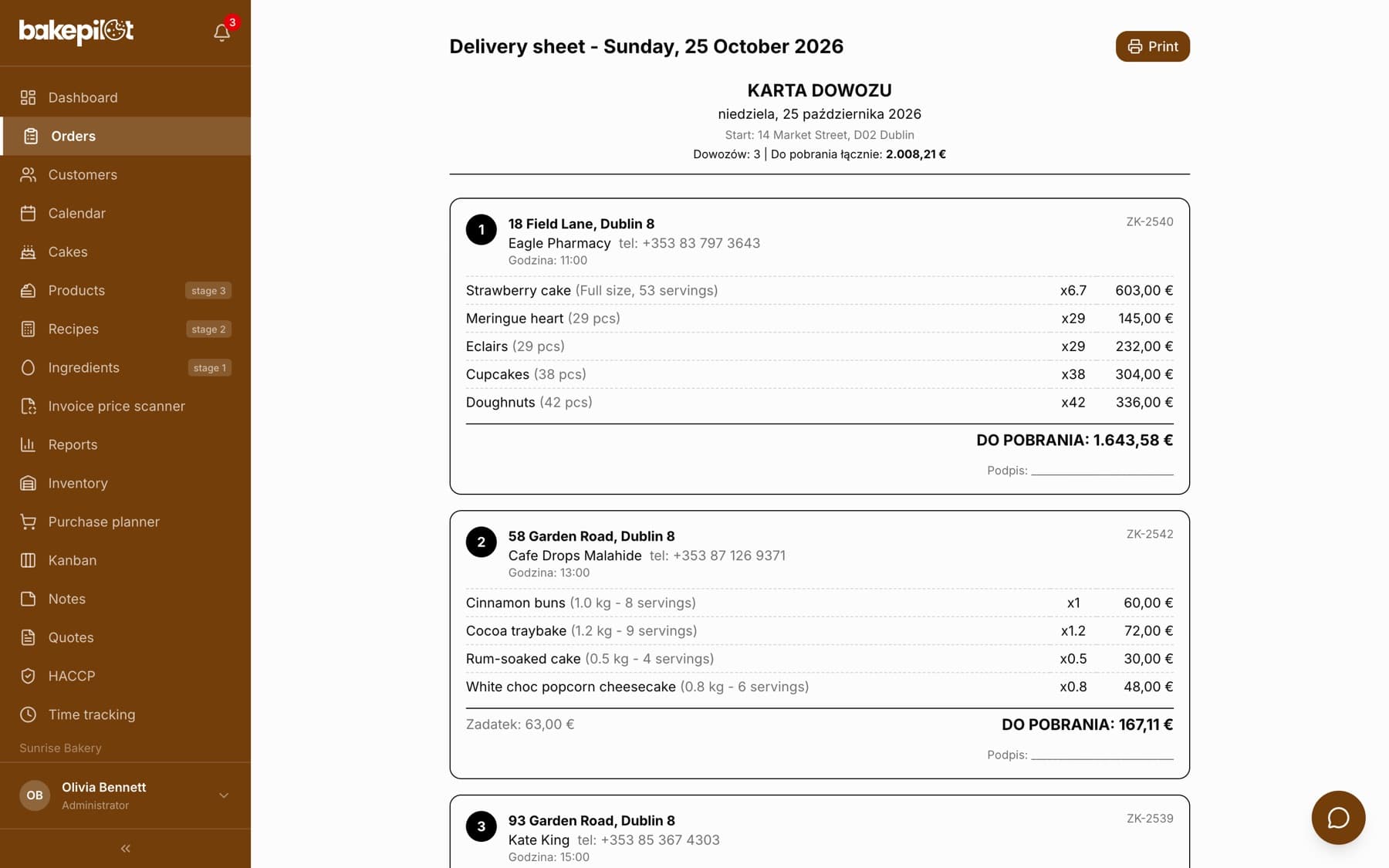
You print the driver sheet: a numbered list of stops with addresses, times, products to check at handover, amounts to collect and space for the customer's signature. The driver (or you) ticks off the Handed over status directly on the delivery card, stop by stop. Completed deliveries drop to the bottom of the list and their stops turn green, so you can see right away what is left.
- Printable driver sheet: addresses, times, phone numbers, products
- Amount to collect and space for the customer's signature
- Change the status right on the delivery card, without opening the order
- Handed-over deliveries drop to the bottom, completed stops turn green
What's in each plan
From our pricing - the same rules apply in the app. Plan names stay in Polish, as in the app: Podstawowy (Starter), Profesjonalny (Professional) and Mistrzowski (Master). Prices in PLN per month, plus VAT.
| Podstawowy98 PLN | Profesjonalny189 PLN | Mistrzowski319 PLN | |
|---|---|---|---|
| Delivery on the order | |||
| Daily delivery sheet | |||
| Delivery route optimization | |||
| Printable delivery sheet |
Frequently asked questions
Which plan includes deliveries with route optimization?
The Profesjonalny (Professional) and Mistrzowski (Master) plans.
Does the driver need a special app?
No. The route opens in Google Maps on the driver's phone, with every stop in the set order. The driver can also get a printed driver sheet.
Does the route disappear when I mark a delivery as handed over?
No. The planned order stays: handed-over deliveries move to the bottom of the list and their stops are marked green. There is no need to optimize again.
See Deliveries and routes in action
Full access to every feature. 20 days free. No credit card required.