
VAT estimate - introduction
See how much to set aside for VAT without waiting for your accountant.
Last updated:
Fixed cost markup - configured versus real
Recipes calculate cost as ingredients plus a markup percentage from your organization settings. If that percentage is a guess, every price calculated from the margin rests on a cost that does not exist. The “Fixed cost markup” card shows two numbers side by side: the one set in the app and the one that follows from the period's costs - fixed costs plus labor costs divided by direct costs (ingredients and packaging).
- A gap larger than 15 percentage points is spelled out directly
- When there is a gap, we show how the minimum price changes at a 40% margin
- Missing labor costs are flagged - the result is then understated
- You change the markup in Settings, then click “Recalculate all” on the recipe list
Tip: This card answers the question “does my price add up at all”. If your real markup is 128% and you have 40% set, prices calculated from the margin are too low - not because you got the margin wrong, but because the cost you calculate it from is incomplete.
Why you need this tab
The most common problem of a bakery owner is not “how much did I earn” but “how much of this money is not mine”. You usually learn the VAT amount only after the 20th of the following month, when your accountant gets in touch - and by then the money has often already been spent on flour and wages. The “Finance” tab shows the estimate as you go, so you set money aside during the month instead of scrambling at the last minute. It is built around VAT rules in Poland.
- Estimated VAT payable for the selected settlement period
- Payment deadline and the number of days left
- Calculated from documents you already have in BakePilot
- By default visible only to the Administrator role
- Available in the Mistrzowski (Master) plan
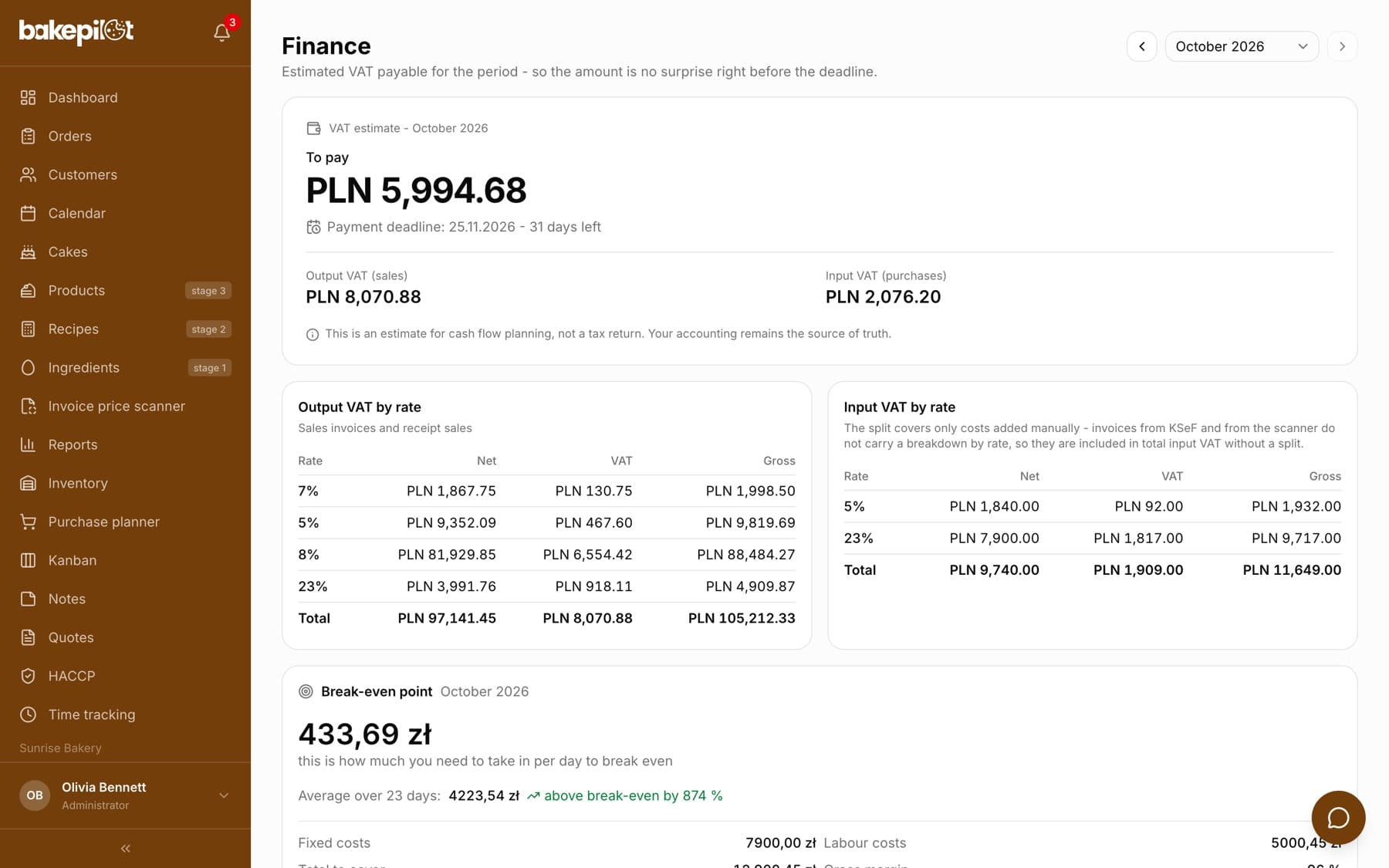
Tip: You will find the “Finance” tab in the main menu of the app. If you cannot see it, check your plan and role - staff with other roles do not have access to it.
This is an estimate, not a tax return
The most important caveat: BakePilot does not calculate tax and does not replace accounting. The amount in the Finance tab is an estimate for cash flow planning - it should tell you roughly how much to set aside in your account. Your accounting remains the source of truth and it prepares the VAT return. The same note is printed under the amount on the period card.
- An estimate for cash flow planning, not a tax return
- Does not replace your accountant or accounting software
- Not meant for filling in official forms
- May differ from your accountant's calculation, and that is normal
Where the data comes from
The tab does not ask you for extra work - it uses the documents you already keep in BakePilot. On the output tax side, that is the tax you collect from customers, it takes sales invoices and receipt sales from daily reports. On the input tax side, that is the tax on your purchases, it takes purchase invoices (downloaded from KSeF, Poland's National e-Invoicing System, and scanned) and costs added manually.
- Output: sales invoices issued in BakePilot
- Output: takings from receipt sales in daily reports
- Output: off-register sales - amounts from sales channels (for example delivery platforms) that do not have “Rung up on the cash register” ticked in Settings, at the VAT rate chosen for the channel
- Input: purchase invoices downloaded from KSeF or scanned
- Input: costs added manually in the Finance tab
- Documents go to a period by their sale date
The period card - what you see on it
At the top of the tab there is the “VAT estimate” card for the selected period. The header says whether it is “To pay”, “To carry forward to the next period” or “Nothing to pay”, with the amount below it. Next to an amount to pay you see the “Payment deadline” with the date and the number of days left - the deadline is the 25th day of the month following the period. Below are two items: “Output VAT (sales)” and “Input VAT (purchases)”.
- “To pay” - the amount to set aside for the period
- “To carry forward to the next period” - when VAT on purchases exceeds VAT on sales
- “Payment deadline” - the 25th of the following month and a day counter
- “Output VAT (sales)” and “Input VAT (purchases)” as components
Changing the period
You choose the period in the top right corner: with the “Previous period” and “Next period” arrows or from the drop-down list. You cannot go into the future - the furthest is the current period. Whether a period is a month or a quarter depends on your invoice settings.
- Open the “Finance” tab
- Click the “Previous period” arrow or open the list with the period name
- Choose a month or a quarter - the whole tab recalculates for that period
Breakdown by rate and source documents
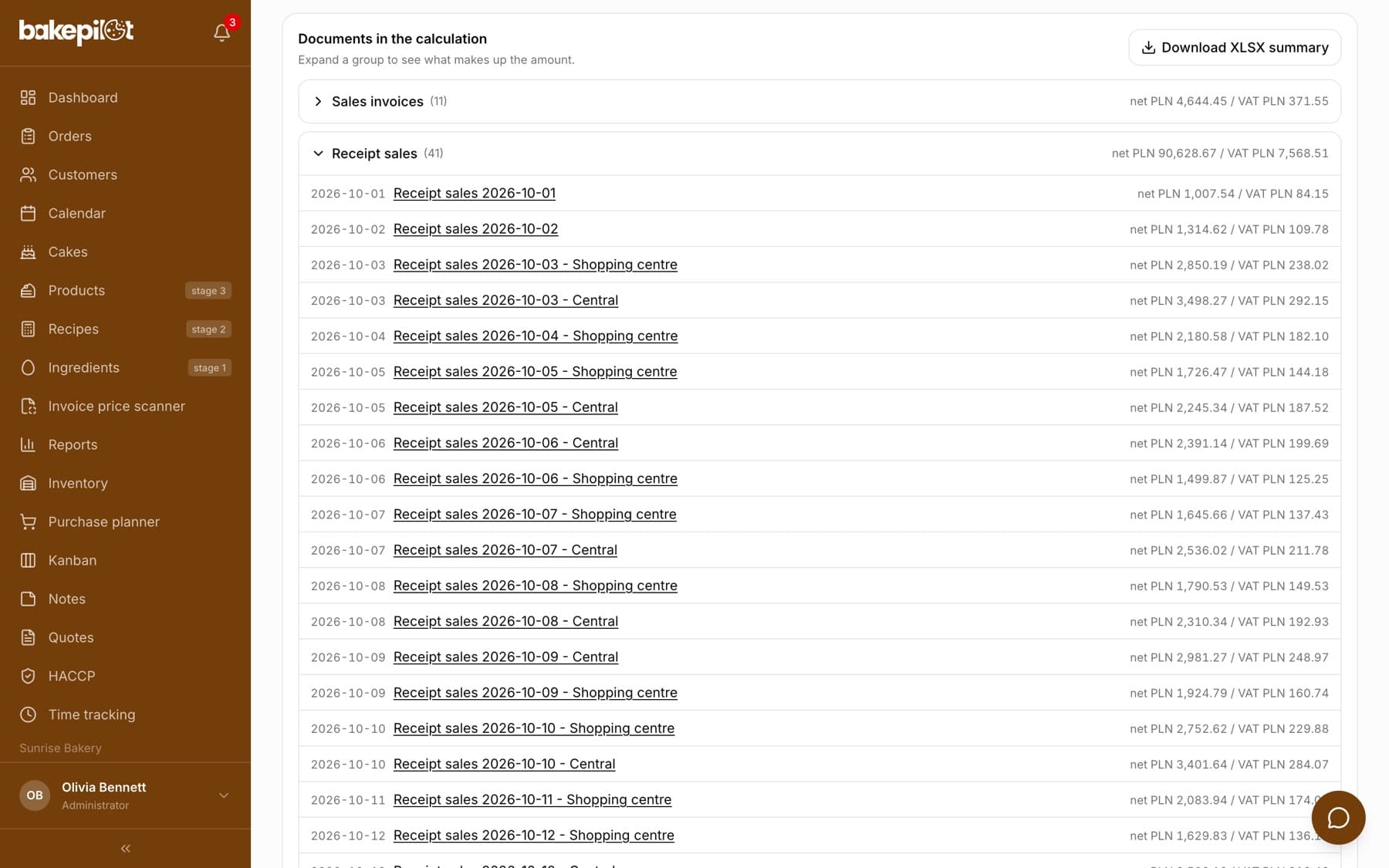
Under the period card there are two tables: “Output VAT by rate” and “Input VAT by rate”, with the columns “Rate”, “Net”, “VAT”, “Gross”. The input breakdown covers only costs added manually - invoices from KSeF and from the scanner do not carry a split by rate, so they go into the total without a breakdown. Further down, the “Documents in the calculation” section groups documents into expandable lists with a link to each of them.
- “Sales invoices” - with a link to each invoice
- “Receipt sales” - day by day, with a link to the daily report
- “Off-register sales” - day by day (with sales points, with the point name), with a link to Reports
- “Purchase invoices” - from KSeF and from the scanner
- “Costs added manually”
- Net and VAT totals for each group
The tab shows its own gaps
BakePilot does not pretend to know everything. If something is missing, a yellow “data gaps” box appears under the period card with a list of what is missing. Treat it as a to-do list if you want a more accurate estimate. When there are no gaps, the box does not appear at all.
- Days without a split of takings by VAT rate - receipt sales from those days were left out of the calculation
- No daily reports in the period
- Documents in a currency other than PLN - skipped
- Purchase invoices without VAT amounts read - left out of input VAT
Tip: Start by filling in the split of takings in your daily reports - it is usually the biggest missing piece.
Settlement settings
In the “Invoices” tab, the “Settings” button opens “Invoice settings”. There you tick “Active VAT payer” and choose the settlement period: “Monthly” or “Quarterly”. This determines which periods the Finance tab shows and the payment deadline it calculates. If you untick active VAT payer, instead of amounts you will see the message “Your company is not an active VAT payer”.
- “Active VAT payer” - turns the estimate on or off
- “Monthly” or “Quarterly” period
Administrator password
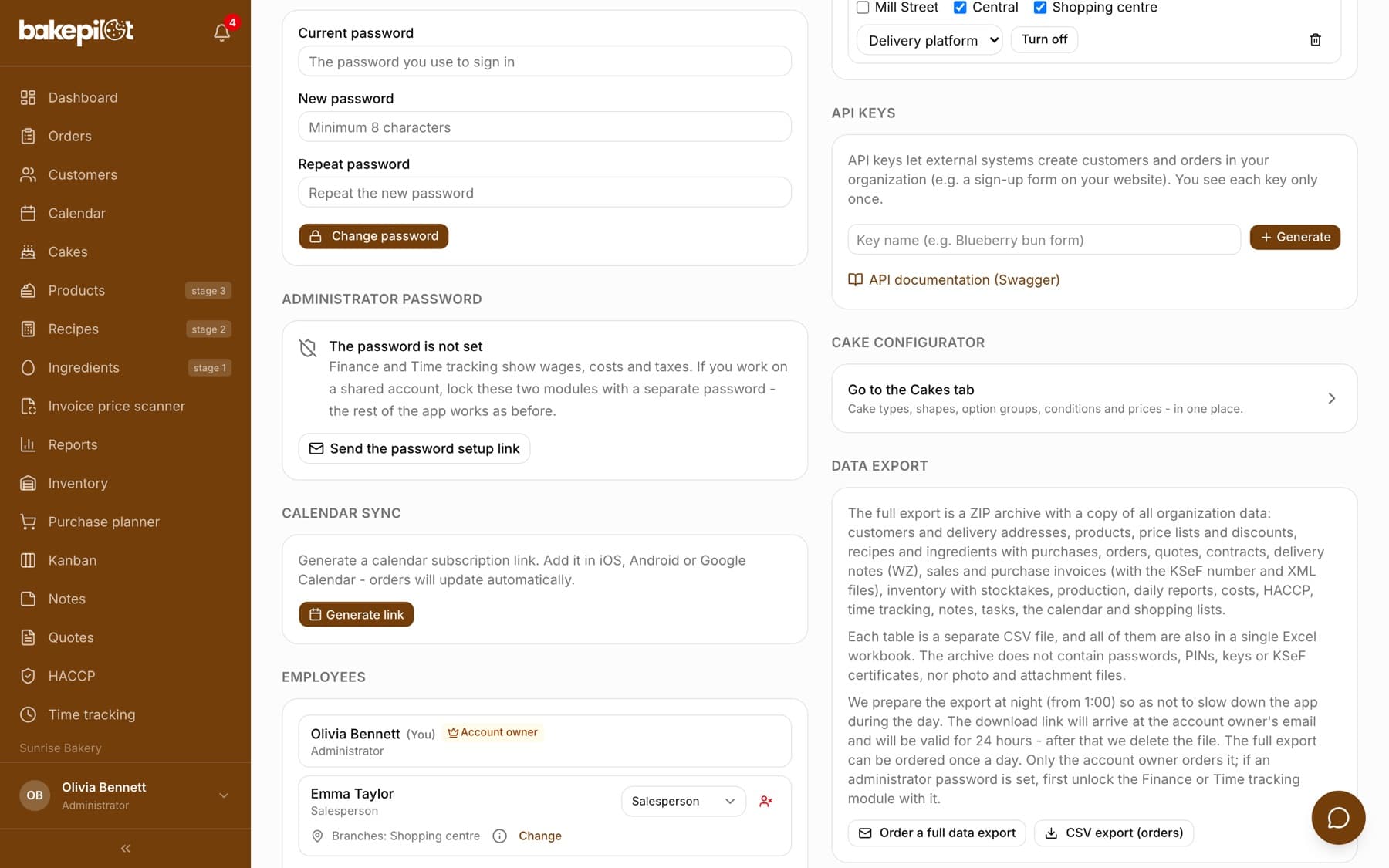
If your bakery works on one shared account, you can lock the Finance and Time tracking tabs with an extra password. You set it in “Settings” in the “Administrator password” section - only from a link sent by e-mail. Once unlocked, a “Lock again” button appears in the top right corner of the tab.
Frequently asked questions
Is this my VAT return?
No. It is an estimate that helps you plan cash flow. Your accounting prepares the return based on the full set of documents, and it is the source of truth.
Why is the amount different from the one my accountant gives me?
Because your accountant sees all documents, including those that are not in BakePilot, and applies the full settlement rules. The estimate counts only what you have in the app, skips documents in foreign currencies and does not know the tax split by rate in invoices from KSeF. A difference is expected.
Who in the company can see the Finance tab?
By default only people with the Administrator role - salespeople, bakers and warehouse staff do not have access. If you want, you can tick Finance viewing for another role in the permissions matrix, for example the Accountant. Regardless of that, the tab can be locked with the administrator password.
I am not an active VAT payer - is the tab useful to me?
In that case untick “Active VAT payer” in the invoice settings. Instead of amounts you will see a message that the estimate is not calculated.
Which period does an invoice go to?
To the period indicated by the sale date on the document, not by the issue date or payment date.
Related articles
Splitting takings by VAT rate
Finance
Completing earlier periods and manual costs
Finance
Exporting a summary for your accountant
Finance
Break-even point
Finance
Daily report
Reports
Sales channels and cash taken out of the register
Reports
Automatic purchase invoices from KSeF
Purchases
Issuing invoices
Invoices
Administrator password
Settings