
Break-even point
How much you need to take in per day to break even.
Last updated:
What this number shows
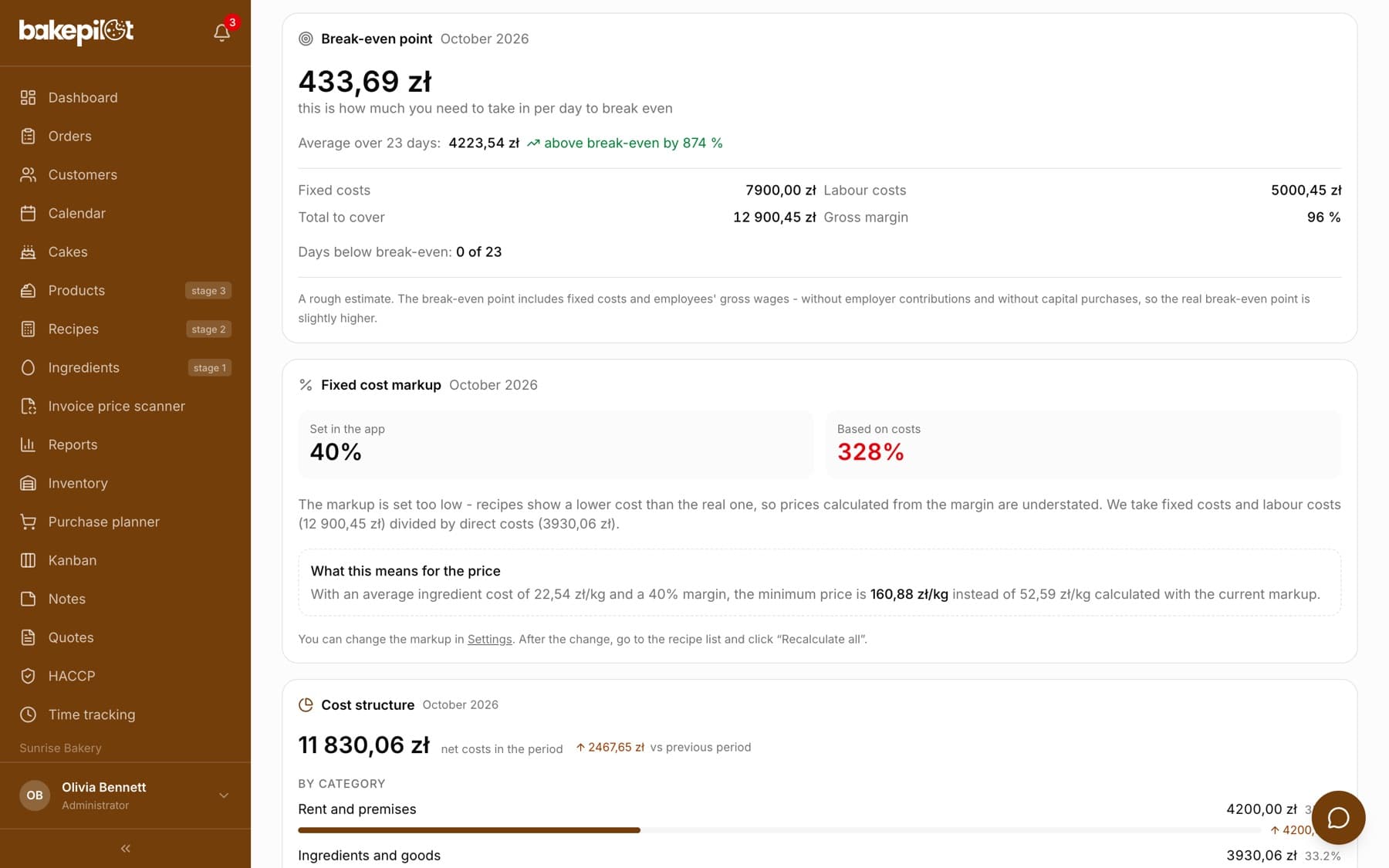
The break-even point is the amount of takings at which you break even: anything below means you are losing money, anything above is profit. The “Break-even point” card in the Finance tab shows it as a daily amount with the caption “this is how much you need to take in per day to break even”, because that is the easiest way to compare it with what is in the till at the end of the day.
- Daily break-even for the selected month or quarter
- “Average over N days” - the average takings for the period and the note “above break-even by X %” or “below break-even by X %”
- “Days below break-even: X of Y”
Tip: One number to remember is worth more than a chart. If you know that your break-even is 2,300 PLN, an evening glance at the till tells you right away whether the day paid off.
Where the data comes from
You do not need to enter anything manually. The “Fixed costs” row is purchase invoices and manually added costs with a category of the “Fixed cost” type. “Labour costs” are taken directly from the payroll of the Time tracking module for the same period. “Gross margin” is calculated from net takings minus costs from categories of the “Direct cost” type (ingredients, packaging). “Total to cover” is the sum of fixed costs and labor costs.
- “Fixed costs” - rent, utilities, external services, accounting, insurance
- “Labour costs” - the gross amount from payroll in the Time tracking module
- “Gross margin” - takings minus ingredients and packaging
- Takings are the cash register amounts from daily reports plus off-register sales from sales channels that are not rung up on the cash register
- All amounts are net, because you settle VAT separately anyway
Why assigning categories matters
The break-even point is only as good as the category assignment. A rent invoice put in the “Other” category will not raise the break-even point, so it will come out lower than it really is. If some documents do not have a category yet, a note under the calculation says how many documents, and for what amount, were left out of the calculation.
- Purchases in categories of the “Investment” type (an oven, a mixer) are deliberately left out of the break-even point - this is not a cost you have to cover every month
- Ingredients and packaging lower the margin instead of raising the amount to cover
- Documents without a category are flagged, because they understate the result
Tip: On the purchase invoice list you can select several items at once (also as a range, with the Shift key) and assign them a category with the “Assign category” button.
When we do not show the break-even point
There are situations in which any number would be misleading, so instead the card shows “The break-even point cannot be calculated for this period. You will find the reasons below.” This happens when there are no sales in the period or when ingredient costs exceed takings - then the break-even point simply does not exist, because every further sale deepens the loss. Missing data from the Time tracking module does not block the calculation, but in the “Labour costs” row you will see “no data”, with a note below that the break-even point is understated.
- No sales in the period - no break-even point
- Ingredient costs higher than takings - no break-even point
- No labor costs - break-even calculated, but marked as understated
What this number does not include
This is an indicative estimate for planning, not an accounting calculation. We include employees' gross wages in the break-even point, but without employer-side contributions, so the real break-even point is somewhat higher than shown. We also do not include income tax or loan installments. This note is printed at the bottom of the card.
- Without employer-side ZUS contributions (Polish social security)
- Without income tax
- Without investment purchases
Tip: Treat the result as a lower limit. If your takings barely reach the break-even point, you are really in the red.
Frequently asked questions
Why is the break-even point lower than I expect?
The most common reason is fixed costs assigned to the wrong category or to no category at all. Check the “Cost structure” section in the same tab - if rent or utilities sit in “Other”, the break-even point will come out too low.
Do I need the Time tracking module?
No, but without it the break-even point will not include wages. In the “Labour costs” row you will see “no data”, and under the calculation a note that the break-even point is understated.
Why is the break-even point for a quarter different from the one for a month?
The daily amount is spread over the number of days in the selected period, and fixed costs and sales differ in each period. The monthly view is more convenient for day-to-day control.
Who can see this number?
By default only people with the Administrator role - the whole Finance tab is reserved for them. You can give viewing access to another role in the permissions matrix and, independently, lock the tab with the administrator password.