
Sales channels and cash taken out of the register
Amounts from Pyszne.pl, Uber Eats and other channels next to the register takings, and itemising money taken out of the register with a reason.
Last updated:
Why sales channels
The money for orders from delivery platforms is transferred by the platform later, usually in one sum. A sales channel is a separate field in the daily report where you enter how much you sold that day through Pyszne.pl (a Polish food delivery platform), Uber Eats or another route. At the end of the month you have a total to compare with the transfer from the platform. For each channel you also mark whether these sales are rung up on your fiscal cash register, which decides whether the amount increases the day's takings.
- A channel “Rung up on the cash register” (the default): the sales are already in the register takings, and the amount is used to check the transfer from the platform
- A channel without this setting: the amount is “Off-register sales”, added to the day's takings and to the VAT estimate
- In both cases the register discrepancy is calculated the same way as before; channel amounts do not change it
Rung up on the register or off-register
The “Rung up on the cash register” switch is next to each channel. When it is ticked, sales from this channel are already in the register takings, so the app does not count them a second time; the amount only tells you how much should come in from the platform. When you untick it, a “VAT rate” field appears, and the amount from the daily report is added as off-register sales.
- Off-register sales increase the day's takings on the dashboard, in analytics and in the break-even point in Finance
- In the VAT estimate they count towards output VAT at the chosen rate: “5% (takeaway)”, “8% (delivery, catering)”, “23%” or “0%”
- You can change the rate and the switch at any time in the channel's row in Settings; the change applies from that moment on
- Each amount remembers the channel's setting from the day it was saved, so changing the switch does not recalculate closed months
- With sales points turned on, an off-register channel must work at exactly one sales point, and the “Card terminal” always stays on the register
Tip: Orders from delivery platforms should usually be rung up on the fiscal cash register, like any sale with a receipt. In that case, leave the switch ticked. If you are not sure how to account for sales through a platform and which VAT rate to apply, ask your accounting office.
How to add a channel
Sales channels are set up by the Administrator in Settings, in the “Sales sources” section.
- In the “Sales sources” section, tick “I also sell through platforms and other sources”
- Enter the name in the “Name, e.g. Pyszne.pl” field
- Choose the type: “Delivery platform”, “Card terminal” or “Other”
- Leave “Rung up on the cash register” ticked if these sales go through the register; otherwise untick it and choose the “VAT rate”
- If you have sales points turned on, in “Points where it is used” leave ticked the sales points that use this channel
- Click “Add”. The channel appears as a field in the daily report
- A channel ticked at all sales points works everywhere, but only if it is rung up on the register
- With sales points turned on, an off-register channel must have exactly one sales point ticked, otherwise saving returns “An off-register channel must be assigned to exactly one sales point - otherwise its amount is counted in every sales point's report”
- The “Card terminal” type has no switch; its amount is always already in the register takings
- A sales point's report shows only the channels assigned to that sales point
- “Turn off” hides the channel from new reports, and saved amounts remain; a channel with amounts cannot be deleted
Amounts in the daily report
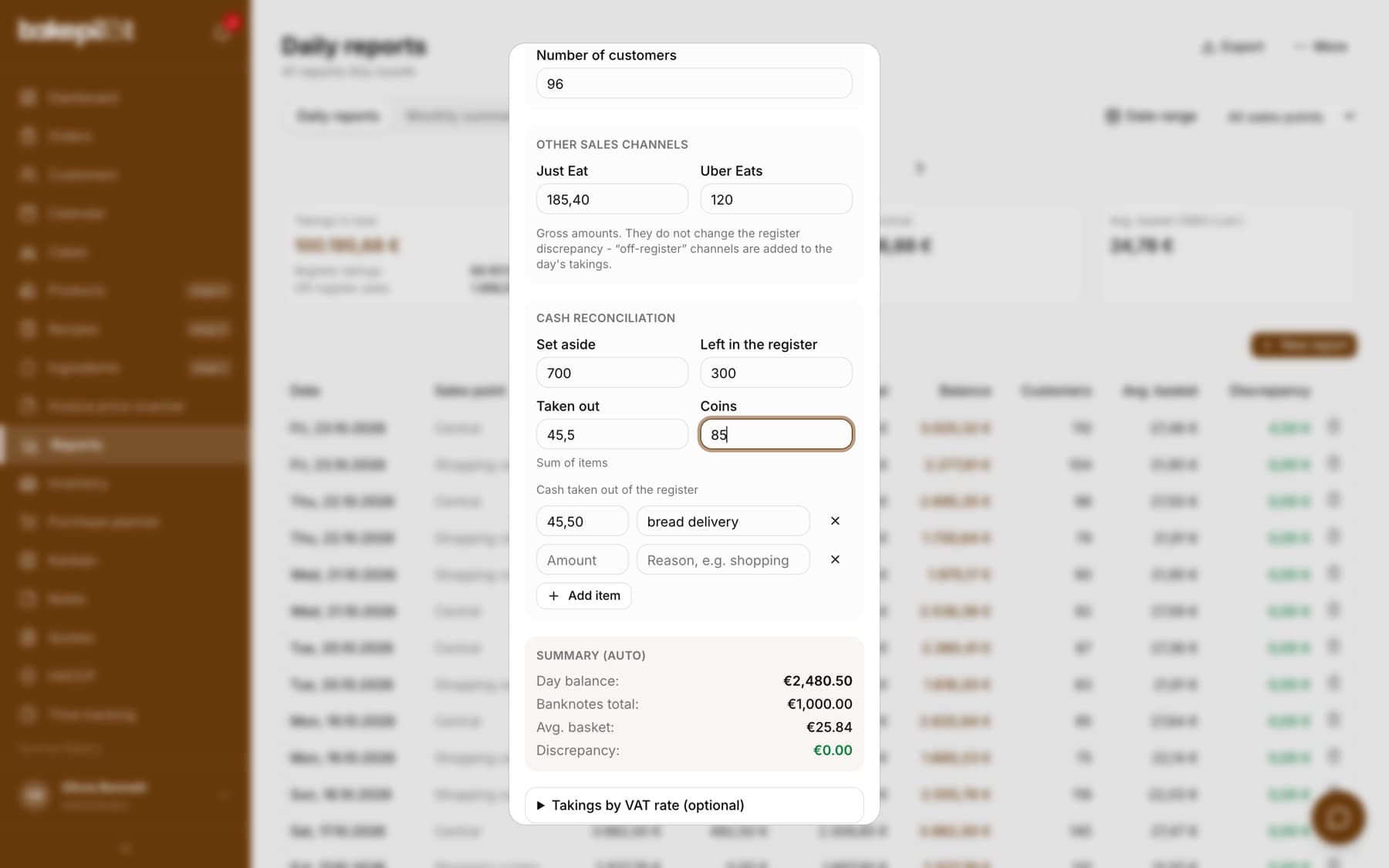
The report window gets an “Other sales channels” section with a field for each channel. You enter gross amounts, meaning what the customers paid. Below the fields there is a reminder: “Gross amounts. They do not change the register discrepancy - “off-register” channels are added to the day's takings.” The register takings and the cash reconciliation stay as you entered them; amounts from off-register channels are added to the day's takings in the summaries, on the dashboard and in Finance.
Tip: When you turn off sales channels in Settings, you will see the previously saved amounts in the report as read-only.
Cash taken out of the register with a reason
The “Taken out” field in the cash reconciliation is the money taken out of the register during the day, e.g. to pay for a bread delivery or small purchases. Instead of one amount, you can itemise it: click “Itemise” next to the “Taken out” field, then enter the amount and reason for each item. The “Taken out” field then becomes the total of the items (labeled “Sum of items”) and cannot be changed by hand.
- In the report window, in “Cash reconciliation”, click “Itemise” next to “Taken out”
- In the “Cash taken out of the register” list, enter the amount and the reason, e.g. “bread delivery”
- Add the next withdrawal with the “Add item” button, and remove an unneeded one with the cross
- Save the report
- The register discrepancy is calculated the same way as before; “Taken out” is simply the total of the items
- Itemising is optional: you can still enter just the “Taken out” amount
Month summary
The “Monthly summary” tab gets two tables. “Other sales channels” shows a “Total” and “Days” for each channel, that is how many days had an amount entered, and below the channel name a label based on the settings saved with the amounts: “On the fiscal register”, “Off-register, VAT 8%” or “Partly off-register, VAT 8%” when some days were saved before the switch was changed. “Cash taken out by reason” adds up the itemised withdrawals by reason, with the number of items. The report export also gets columns with the channel amounts.
- When there are off-register sales in the period, the “Total takings” card becomes “Takings in total”, split into “Register takings” and “Off-register sales”
- The “Takings by sales point” table then gets the “Register takings” and “Off-register sales” columns
- Export to CSV and XLSX then gets an “Off-register sales” column
- Without off-register channels, the summary looks the same as before
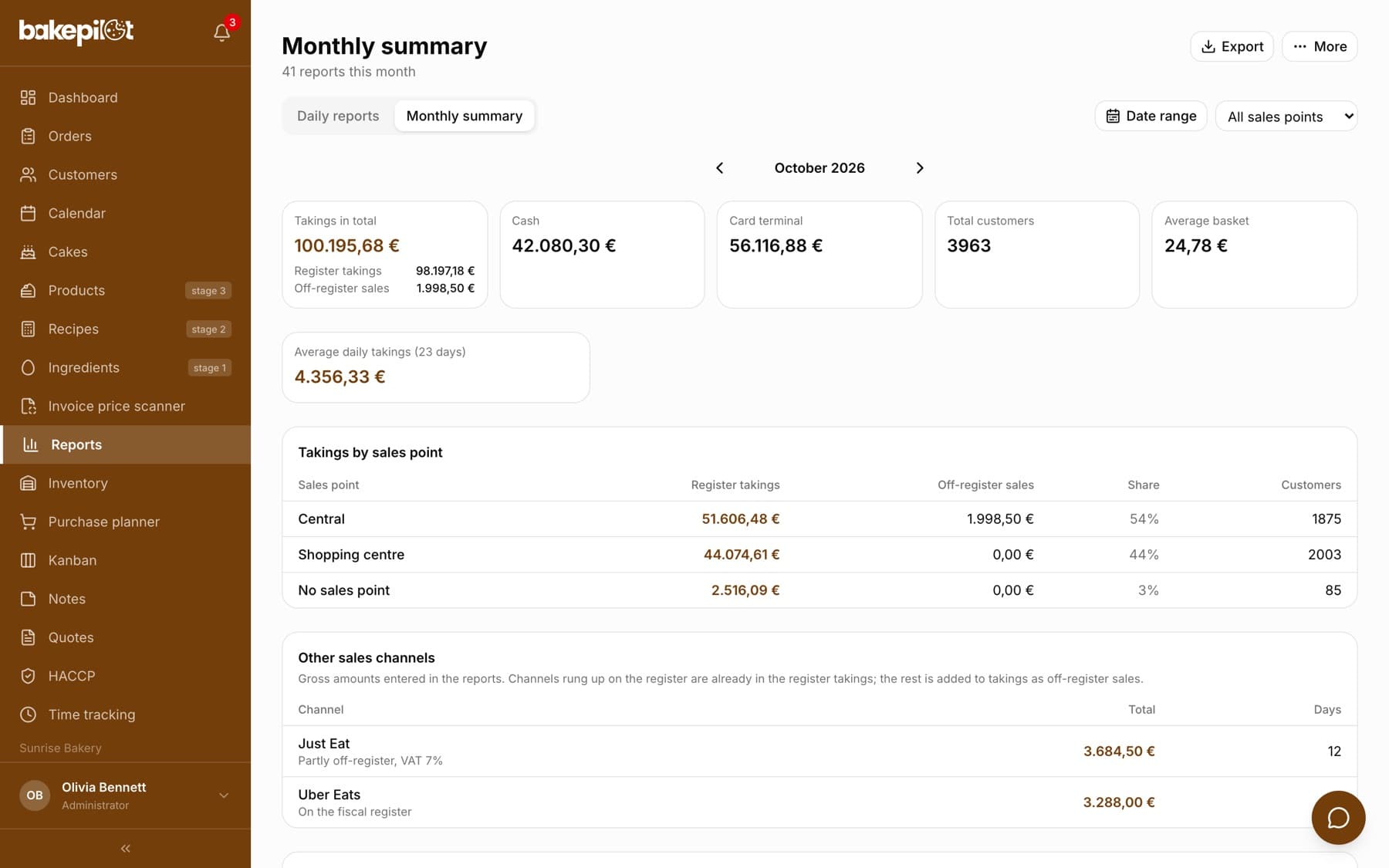
Tip: Example: in the month summary, Pyszne.pl has 3,480 PLN from 26 days. Compare this amount with the settlement from the platform. The difference shows orders that were not entered or deductions made by the platform.
Frequently asked questions
Why don't the Pyszne.pl amounts increase my takings?
Because the channel has “Rung up on the cash register” ticked. In that case, these sales are already in the register takings, and adding them a second time would double the amount. If you do not ring up platform orders on the register, untick the switch for the channel in Settings and choose a VAT rate. The amounts will then be added to the day's takings and to the VAT estimate.
Will changing the switch also change earlier days?
No. Each amount remembers the switch and the VAT rate from the day it was saved, so changing the channel setting only applies from that moment on. A closed month and the VAT estimate calculated from it stay as they were. In the summary you will then see the label “Partly off-register” next to the channel. If an earlier day should fall under the new setting, open that report, clear the channel amount and save, then enter it again and save. Only an amount entered anew takes the current channel setting.
Do I have to itemise every withdrawal from the register?
No. Itemising is optional. It helps when you want to know what the cash from the register was spent on during the month; the “Cash taken out by reason” table adds up the items by reason.
Do sales channels work without sales points?
Yes. Without sales points, each channel has a field in every daily report.