
Setting up your company details
Where to correct your bakery's name, NIP, address, bank details and logo, and what else you set in the Organization section.
Last updated:
Where to find your company details
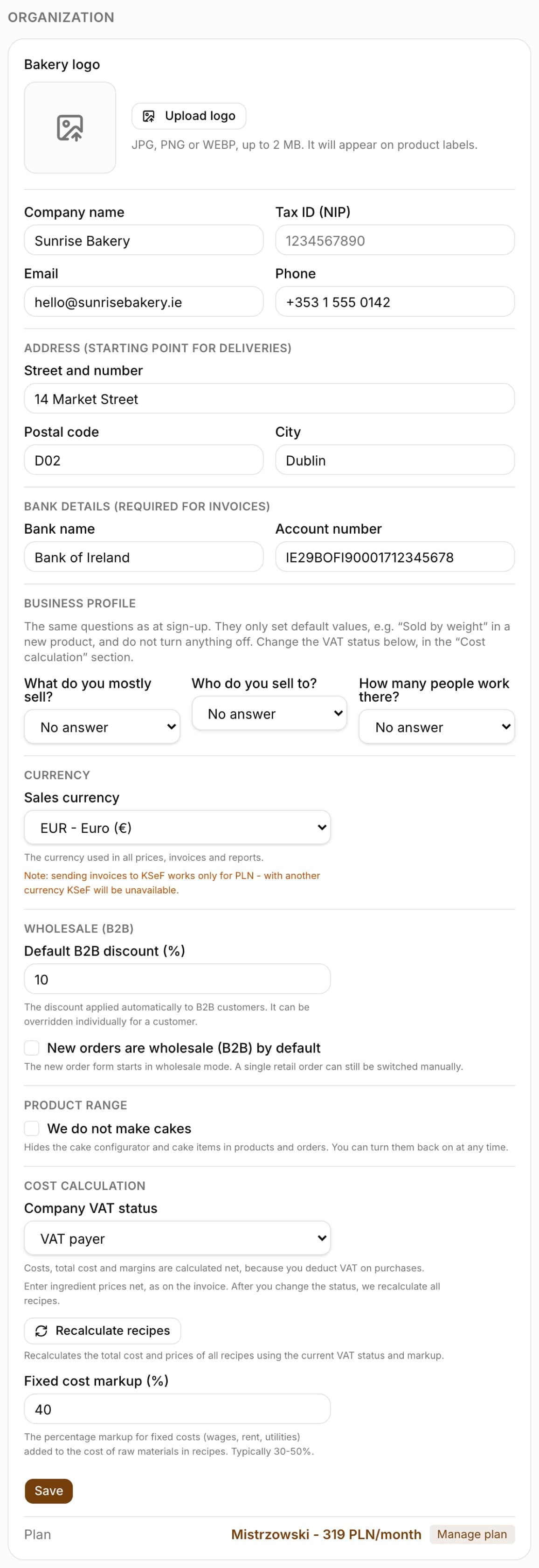
Your company details are in Settings, in the “Organization” section. If you signed up with a NIP (the Polish tax ID), the name and address are already filled in from the VAT taxpayer register - here you can correct them manually. The section is edited by the Administrator (or a custom role with permission to edit company details); everyone else sees the details read-only.
- Open Settings and find the “Organization” section
- Correct the “Company name”, “Tax ID (NIP)”, “Email” and “Phone” fields
- Click “Save” - a “Saved” message appears next to the button
Address as the starting point for deliveries
The “Street and number”, “Postal code” and “City” fields are labeled in the app as “Address (starting point for deliveries)”. BakePilot starts the route from this address when planning deliveries, so enter the address of your production kitchen, not your accountant's office.
- The address is the starting point when planning the delivery route
- You can change all three fields at any time
Bank details for invoices
In the “Bank details (required for invoices)” section, enter the “Bank name” and “Account number”. Without an account number, an invoice does not have full transfer details, so fill it in before you issue your first document in the Invoices module.
- “Bank name” - for example mBank
- “Account number” - 26 digits (Polish account number format), you can enter it with spaces
Tip: Set the account number right after signing up - your invoices will include full transfer details from the start.
Bakery logo
At the top of the “Organization” section there is a “Bakery logo” field. Click “Upload logo” and choose a JPG, PNG or WEBP file of up to 2 MB. The logo appears on product labels. You can replace an uploaded logo with the “Change logo” button or remove it with the “Delete” button.
- Formats: JPG, PNG, WEBP
- Maximum file size: 2 MB
- The logo appears on product labels
- “Change logo” and “Delete” - change it at any time
Other organization settings
Further down in the same section you set the sales currency, default rules for wholesale customers, the company VAT status and the fixed cost markup for recipes. You save everything with the same “Save” button.
- “Sales currency” - used in all prices, invoices and reports. With a currency other than PLN you will see the warning “Note: sending invoices to KSeF works only for PLN - with another currency KSeF will be unavailable.” (KSeF is Poland's National e-Invoicing System)
- “Default B2B discount (%)” - applied automatically to wholesale customers, can be overridden for a customer
- “New orders are wholesale (B2B) by default” - the order form starts in wholesale mode
- “We do not make cakes” - hides the cake configurator and cake items in products and orders
- “Company VAT status” - “VAT payer”: costs, batch cost and margins are calculated net; “VAT exempt”: VAT is added to the cost of ingredients. You always enter ingredient prices net, as on the invoice
- “Fixed cost markup (%)” - added to the cost of ingredients in recipes, typically 30-50%
- “Recalculate recipes” (in the “Cost calculation” part) - recalculates the costs of all recipes, for example when not all of them recalculated by themselves after a VAT status change
Frequently asked questions
My NIP was not found during sign-up. What now?
We use the Polish Ministry of Finance register of VAT taxpayers, so VAT-exempt companies may not be in it. The sign-up form then lets you enter the name and address manually - we approve the account after verification, and you can correct the details later in the “Organization” section.
Can I have several companies in one account?
No. One account corresponds to one organization. If you run several companies, create a separate account for each of them.