
Mobile app (Android)
How to install BakePilot on an Android phone and how to use the app on an iPhone.
Last updated:
Where to download the app
You can download BakePilot for Android from Google Play - search for “BakePilot” or go to play.google.com/store/apps/details?id=pl.bakepilot.app. It is the same app you know from the browser: the same orders, products and settings. There is no iPhone version in the App Store yet - on an iPhone and iPad, use BakePilot in the Safari browser at app.bakepilot.pl.
- Android - Google Play, the “BakePilot” app
- iPhone and iPad - the Safari browser, address app.bakepilot.pl
- The app is free - you only pay for the BakePilot subscription
- You do not need to configure anything extra
Tip: Don't want to install the app? BakePilot also works in your phone's browser at app.bakepilot.pl.
First login
After installing, log in with the same email address and password you use in the browser. One account works on a computer, phone and tablet at the same time - the data is in the cloud and you see it the same way everywhere.
- Log in with your app.bakepilot.pl details
- The same account on all devices
- You do not create a separate account for your phone
Order notifications
The Android app sends “New order” notifications straight to your phone screen - with the customer's name and the pickup date, even when the app is closed. On first launch the phone asks for permission to show notifications; you can change it later in the Android system settings.
- A “New order” notification with the customer's name and pickup date
- Works when the app is closed
- Permission for notifications - in your phone settings
What BakePilot looks like on a phone
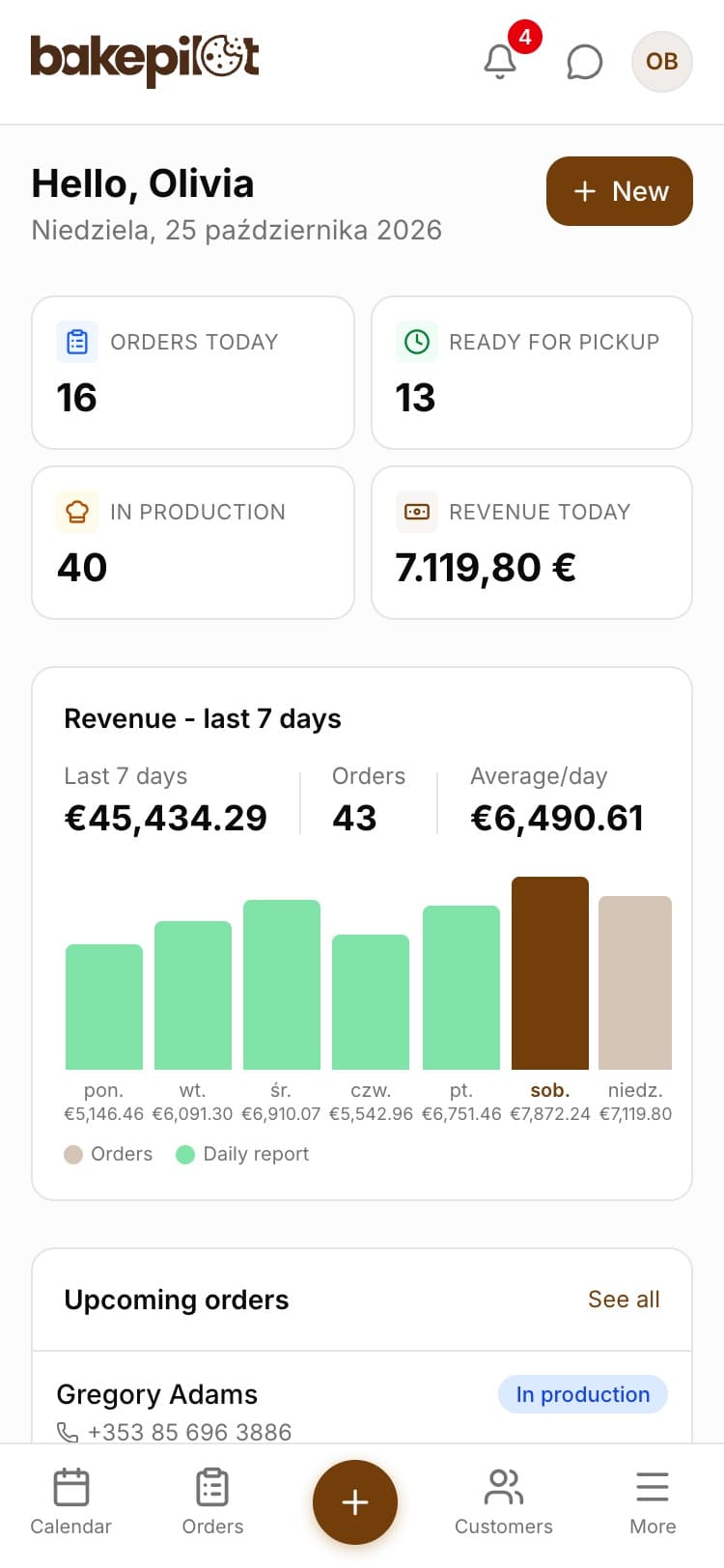
On a phone, the modules are not in the side menu but in the bottom bar: “Calendar”, “Orders”, the plus button for a new order, “Customers” and “More” with the other modules. The Dashboard shows today's orders, revenue from the last 7 days and low stock. You need an internet connection to work.
- Bottom bar: “Calendar”, “Orders”, plus, “Customers”, “More”
- The same features as in the browser, adapted to a small screen
- Speech bubble icon in the top bar, next to the circle with your initials - the help chat without leaving the app
- Requires an internet connection
Frequently asked questions
Is the mobile app paid?
No. Downloading and installing it is free. You only pay for the BakePilot subscription - just like in the browser version.
Do I have to install the app to use BakePilot on my phone?
No. BakePilot works in your phone's browser at app.bakepilot.pl. The app also gives you an icon on the home screen and order notifications.
Does the app work offline?
No. You need an internet connection to work - the data is in the cloud and syncs between devices.