
Importing daily reports from Excel (XLSX)
Upload your takings history from an Excel file, the whole database in a few clicks.
Last updated:
Why import from Excel
If you keep your daily reports in an Excel spreadsheet, you do not need to retype them into BakePilot. The import reads your whole takings history from an XLSX file at once, day by day, and immediately calculates the balance, the average basket and the register discrepancy. It is the fastest way to start using the Reports module when you already have data from previous months or years.
- The whole history uploaded in one file
- All sheets of the file at once, e.g. a separate sheet for 2025 and for 2026
- No retyping day by day
Tip: You will find the import in the “Reports” module, in the “More” menu next to “Export” in the header, under “Import”.
How the import works
The “Import daily reports from XLSX” window takes you through three screens: uploading the file, a preview with column mapping and the result. At every stage you have full control over what goes into the database.
- Click “More” → “Import”, then “Choose file” and select the XLSX file from your disk; click “Next”
- Check the “Data preview” and the column mapping; change it from the list if needed
- Set the “Register takings already include card terminal payments” and “Overwrite reports with an existing date” options
- Click “Import” and read the result: how many days were imported and how many were skipped
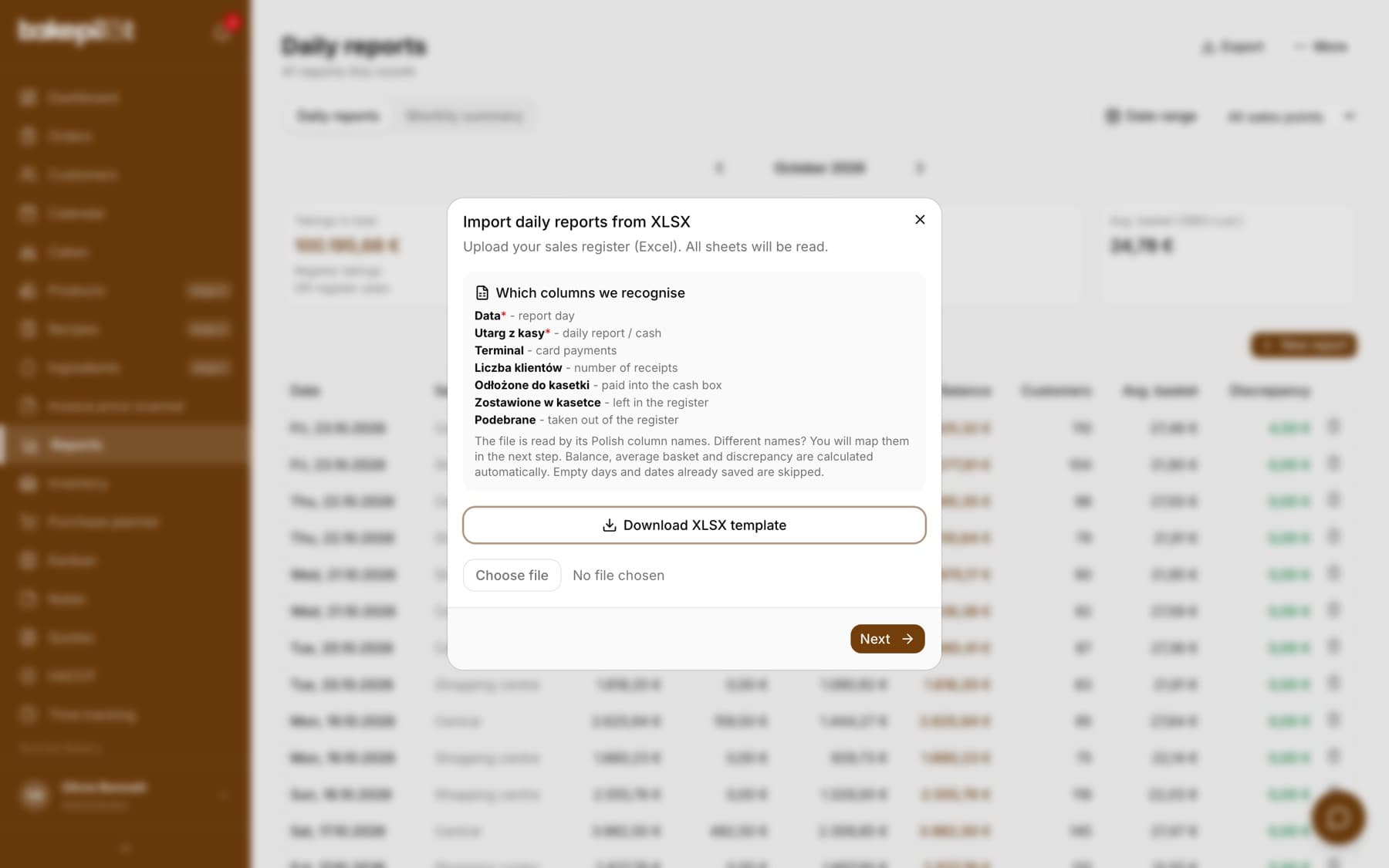
Automatic column recognition
BakePilot recognizes the columns in your file by their names, so you do not need to lay out the spreadsheet in any particular way. The file is read by its Polish column names. The first import screen lists the columns it recognizes; only the date and the takings are required.
- “Date”, the report day (required)
- “Register takings”, the daily report / cash (required)
- “Card terminal”, card payments
- “Number of customers”, the number of receipts
- “Set aside in the cash box”, “Left in the cash box”, “Taken out”, the cash reconciliation
- Small differences in column names do not matter
Manual column mapping and the template
If your file has unusual column names, on the preview screen you choose a BakePilot field from the list for each column of the file, or “- do not map -”. If you are starting from scratch, click “Download XLSX template” to get a spreadsheet with the correct headers that you just need to fill in with data.
- You assign each column of the file to a field from the list
- “Download XLSX template”, a ready file with the correct headers
- Required minimum in the file: a date column and the takings
Tip: Don't have a spreadsheet yet? Download the XLSX template, fill it in with data and upload it back; all columns will be mapped automatically.
Register takings and card terminal payments
Many bakers record the whole day's takings in the daily report, including card payments. That is why the “Register takings already include card terminal payments” option is turned on by default. Cash is then calculated as the takings minus the card terminal, so that the same sales are not counted twice.
- The option is turned on by default
- Cash = register takings - card terminal (with the option turned on)
- Turn it off if you enter cash and card terminal separately in the spreadsheet
Tip: If your “Register takings” column is the total for the whole day with card payments included, leave this option turned on to avoid doubling your sales.
Duplicates, empty days and overwriting
The import is safe: you can upload the same file several times without creating duplicates. Days without data are skipped, and dates already saved in BakePilot are left untouched by default. If you want to update previously uploaded reports, turn on the “Overwrite reports with an existing date” option.
- Empty days in the file are skipped
- Dates already saved are skipped by default (no duplicates)
- The “Overwrite reports with an existing date” option updates previously uploaded days
- You can upload the same file again without worry
What is calculated after the import
After reading the data, BakePilot automatically calculates the balance, the average basket and the register discrepancy for each day, exactly as if you had entered the reports by hand. The card terminal is not part of the cash reconciliation, because cards are a separate payment stream.
- The day's balance
- Average basket
- Register discrepancy = (set aside + left in the register + coins + taken out) - cash takings
- Card terminal payments are not part of the cash reconciliation
Tip: The import does not fill in the breakdown of takings by VAT rate. You fill in those amounts all at once in the Finance module or day by day in the reports.
Frequently asked questions
What format should the import file be in?
An Excel file in XLSX format. If you do not have a ready spreadsheet, download the XLSX template directly in the import window; it already has the correct column headers.
Can I upload data from several years at once?
Yes. The import reads all sheets of the file at the same time, so you can have, for example, a separate sheet for 2025 and for 2026 and upload them in one file.
What happens if I upload the same file twice?
Dates that are already saved in BakePilot will be skipped, so no duplicates are created. If you want to update previously uploaded days, turn on the “Overwrite reports with an existing date” option.
Which columns are required in the file?
The minimum is a date column and the takings. The other columns (card terminal, number of customers, cash reconciliation) are optional and make the calculations more accurate.
My takings already include card payments. Can the import handle that?
Yes. Leave the “Register takings already include card terminal payments” option turned on. Cash will then be calculated as the takings minus the card terminal, so your sales are not counted twice.