
Product variants
Sizes, boxes and price per portion - one product in many versions.
Last updated:
What are variants?
Variants let you sell one product in several versions - e.g. a “Strawberry cake” as 10 portions for 200 PLN, 15-18 portions for 300 PLN and more than 40 portions charged at 22 PLN per portion. Each variant has its own price, number of portions and its own recipes, from which its cost is calculated. You add variants on the product card: click the product in the list and choose “See more”.
- Cake sizes (10 portions / 15 portions / 20 portions)
- Tray bake sizes (22 cm cheesecake = 12 portions, 26 cm cheesecake = 16 portions)
- Boxes (cookies 6 pcs / 12 pcs / 24 pcs)
- Large cakes over 40 portions - price × number of portions
- Each variant with a separate price and its own recipe usage
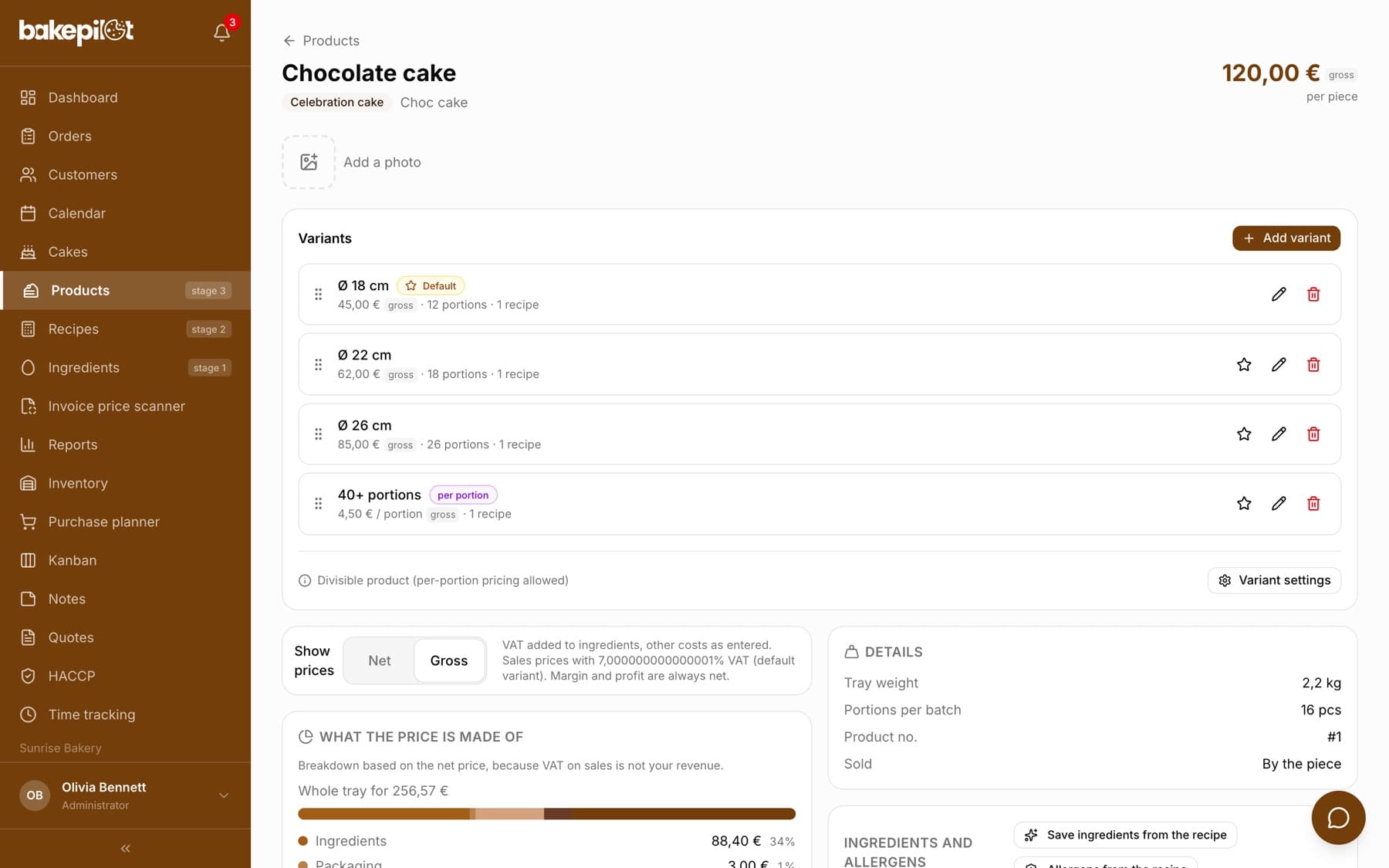
Tip: A new product has no variant, and without a variant it will not get into an order. You add the first variant yourself on the product card.
Variant fields
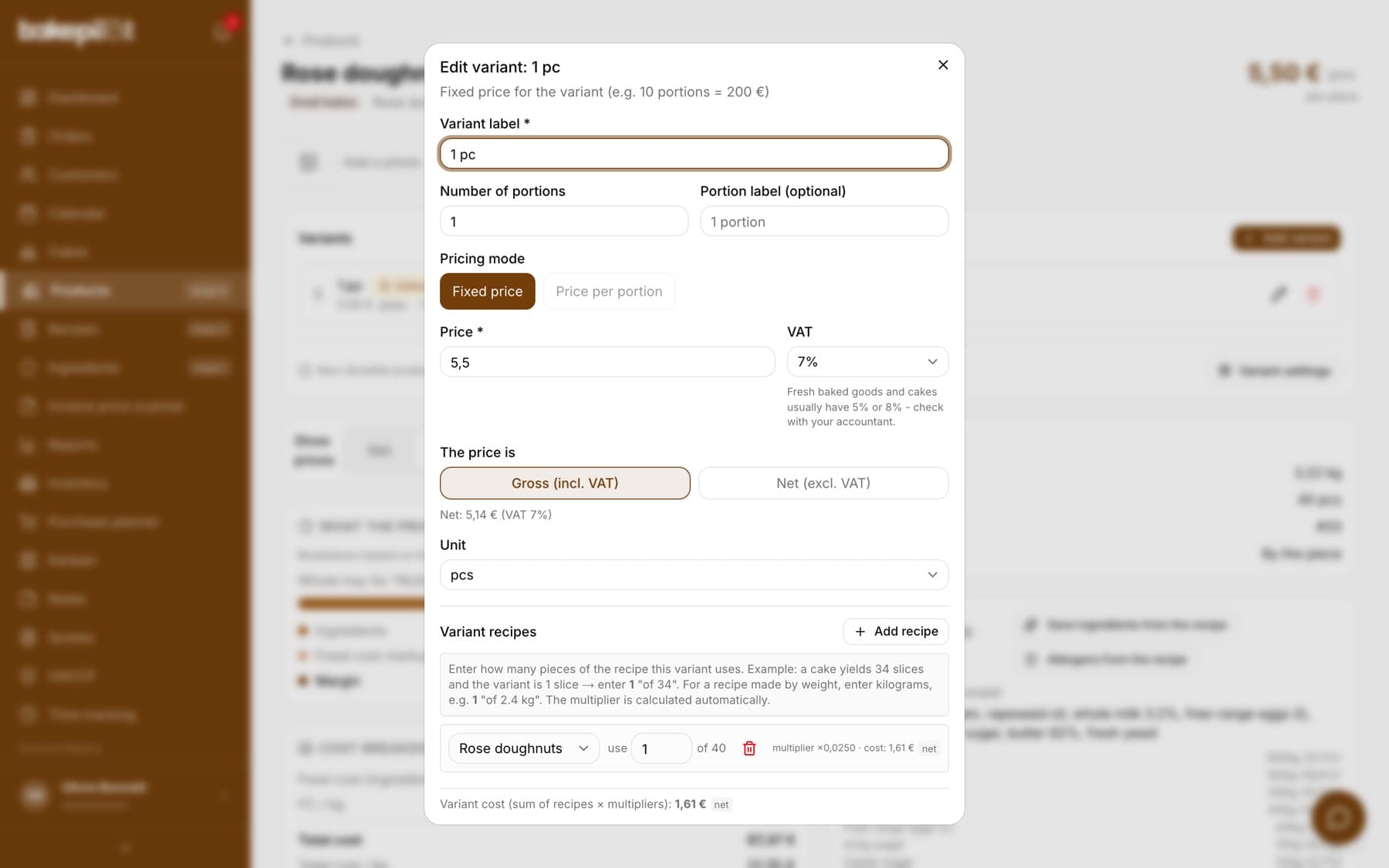
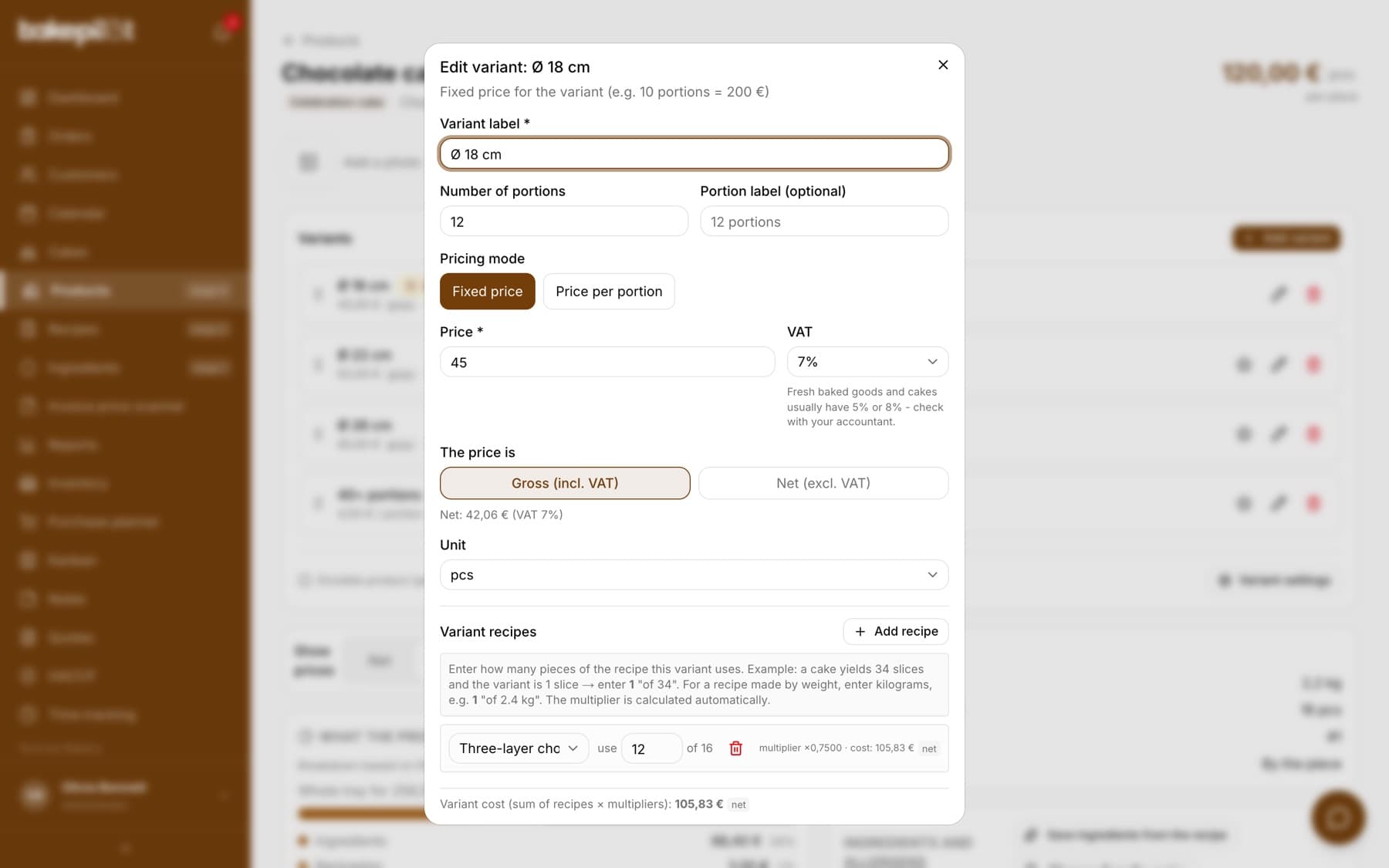
In the variant window you enter the label (e.g. “10 portions” or “Box of 6 pcs”), the price and the unit. You can also add an optional portion label, mark the variant as the default one and link recipes. At the bottom of the window you see the line “Variant cost (sum of recipes × multipliers)” - this is the cost of what you actually sell in this variant.
- Variant label, e.g. “10 portions” or “Box of 12 pcs”
- “Portion label (optional)” - your own description of the portion
- Unit to choose from: pcs, portion, kg, g, pack
- Price with a Gross / Net switch and a VAT rate
- “Set as the product's default variant”
- The last variant cannot be deleted - a product must have at least one
- “Variant cost” has a basis tag: for an active VAT payer “net”, for a VAT-exempt business “ingredients gross”
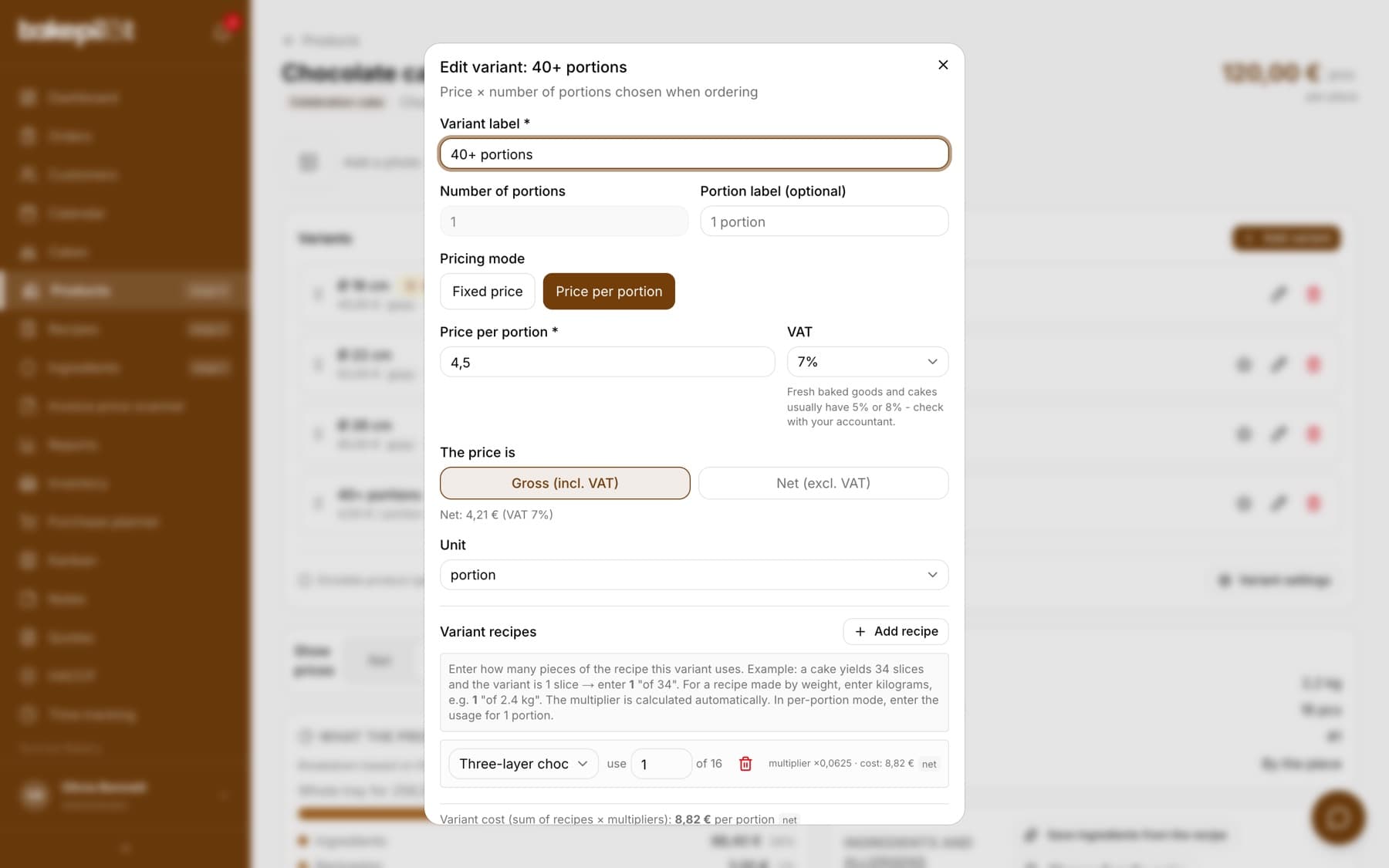
Two pricing modes
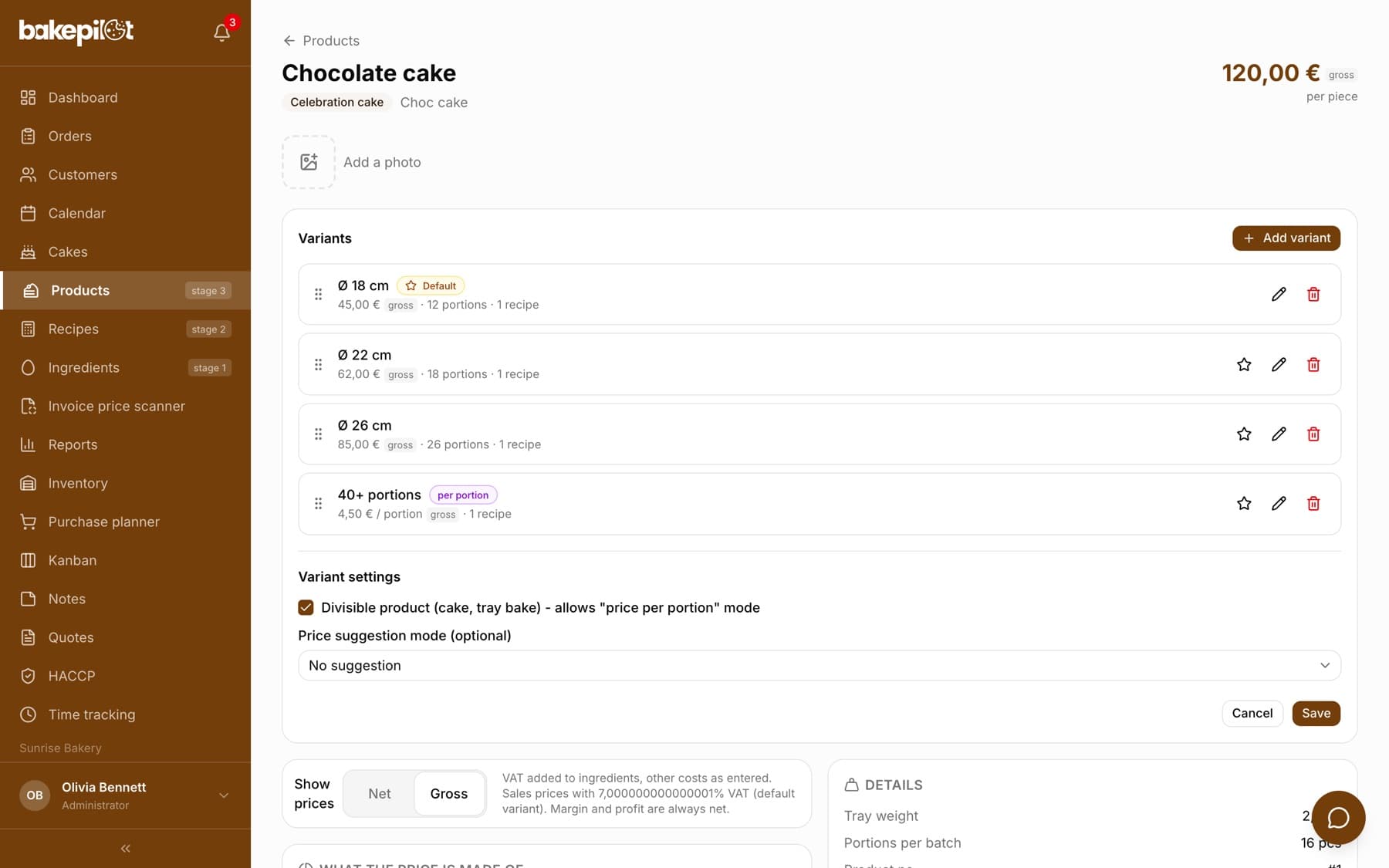
A variant has one of two modes: a fixed price (e.g. 10 portions = 200 PLN) or a price per portion (e.g. 22 PLN × the chosen number of portions). The “Price per portion” mode only becomes available once you click “Variant settings” on the product card and tick “Divisible product (cake, tray bake)”. Without this the mode button is grayed out. Non-divisible items (an eclair, a cookie) only have fixed prices per piece or box.
- Fixed price: 200 PLN for the “10 portions” variant (regardless of the quantity)
- Price per portion: 22 PLN/portion × e.g. 60 portions = 1320 PLN
- Divisible products (cake, tray bake) can use both modes
- Non-divisible products (eclair) only a fixed price per piece or box
Price suggestion
Set the price suggestion mode in the product's “Variant settings”, and BakePilot will suggest what to enter. There are two ways: a percentage markup on the recipe cost (e.g. 200% = a price of 3× the cost) and your average price per portion (e.g. 20 PLN × 10 portions = 200 PLN). You can turn on both - you see both results and choose.
- Percentage markup (e.g. 200% on the cost of ingredients + overheads)
- Price per portion × number of portions in the variant
- Both hints at once under the price field: a green “Suggested price: …” and a blue “Price/portion: …”
- Click a hint - the value is entered into the Price field
- The “Suggested price: …” hint uses the same basis as the price field: with “The price is: Gross (incl. VAT)” the net cost with markup is converted with the rate from the “VAT” field and tagged “gross”, with a net price it is tagged “net”, and for a VAT-exempt business “excl. VAT” - you enter it as it is, without working out VAT in your head
Tip: Pastry shops most often use a markup of 200-250% for celebration cakes and 150-200% for seasonal cakes.
Variant recipes
Each variant has its own list of recipes. In the variant window click “Add recipe”, choose a recipe and enter how much of it this variant uses: the “use … of 40” field for recipes in pieces and portions, or “use … kg of 2,4 kg” for recipes by weight. BakePilot calculates the multiplier itself and shows it under the row together with the cost.
- A variant can have many recipes at once - sponge, cream and glaze
- You enter the usage, not the multiplier: “use 1 of 40” is one doughnut from a batch of 40 pieces
- A recipe in Kilograms mode: you enter kilograms, e.g. “use 1 kg of 2,4 kg”
- In “Price per portion” mode, enter the usage for 1 portion
- The variant cost is calculated automatically: the sum of (recipe cost × multiplier) - you see it at the bottom of the window
Adding a variant to an order
When creating an order you choose a product. If it has more than one variant, a window with the list of variants appears - you click the one the customer wants. A product with one fixed-price variant is added straight away. For a “per portion” variant you enter the number of portions - the price is recalculated live.
- A selection window for products with 2+ variants
- Automatic adding for products with one fixed-price variant - for a “per portion” variant we always ask for the number of portions
- Price per portion: a field for the number of portions with a price preview
- The invoice item name is generated automatically: “Strawberry cake - 15-18 portions”
Variants and the cake configurator
These are two different tools. Use variants when you have set sizes that customers choose from a list. Use the configurator when the customer builds the cake from options (shape × sponge × cream × decoration). A product with “Custom product (cake configurator)” ticked does not use variants - the “Variants” section disappears from its card. If you want both approaches, create two products. Most pastry shops start with variants (simpler) and add the configurator later for wedding orders.
Frequently asked questions
Does a new product have a variant straight away?
No. Products created before variants were introduced got a one-off “Standard” variant with their previous price, but you create a new product without a variant - on its card you will see a message that there are no variants and every product needs at least 1 variant, and you add the first variant yourself.
Can I delete the “Standard” variant?
You can, but a product must always have at least one variant - the last one cannot be deleted. If you only have “Standard”, add a new variant before deleting the old one.
How do invoices work with variants?
The item name on the invoice automatically includes the variant, e.g. “Strawberry cake - 15-18 portions”. For per-portion variants: quantity = number of portions, unit price = price per portion. KSeF (Poland's National e-Invoicing System) and the invoice PDF work as before.
Do variants work with KSeF?
Yes, but only for the PLN currency (like all KSeF invoices). The item name (up to 256 characters) is kept together with the variant.