
Branch warehouse
With several sales points, each branch has its own warehouse next to the main warehouse: separate items, adjustments, minimum stock and stocktakes.
Last updated:
The main warehouse and branch warehouses
The main warehouse is your production: goods received from invoices (“Receive from invoice”) and products received from production land here, and ingredients used in production are taken from here. A branch warehouse is a separate stock list for a shop or outlet - it has its own items, minimum stock, adjustments and stocktakes, counted independently of the main warehouse. A branch is the same location as in the “Sales points” section in Settings.
- The feature is part of the Mistrzowski (Master) plan
- It works when “I have several sales points” is ticked in Settings; without it the Inventory module looks as before and shows only the main warehouse
- Receipt from an invoice, receipt from production and ingredient usage in production always concern the main warehouse
- Goods reach a branch warehouse with a transfer note (MM, the Polish document for moving goods between warehouses) from the main warehouse (article “Transfer between warehouses (MM)”) or manually: you add an item with its stock, adjust the stock or do a branch stocktake
How to switch the warehouse
Above the summary in the “Inventory” module there is a warehouse picker. The selected warehouse is shown in the page address, so after a refresh or from a saved link you come back to the same warehouse.
- Go to “Inventory”.
- Click the list with the warehouse name (“Main warehouse” by default) and choose a branch.
- The list, “Inventory items”, “Low stock” and the type tabs now show only that branch.
- The list contains the “Main warehouse” and the active branches
- An inactive branch whose warehouse still holds goods is on the list with the note “(inactive, view only)” - you can see the stock but cannot change it
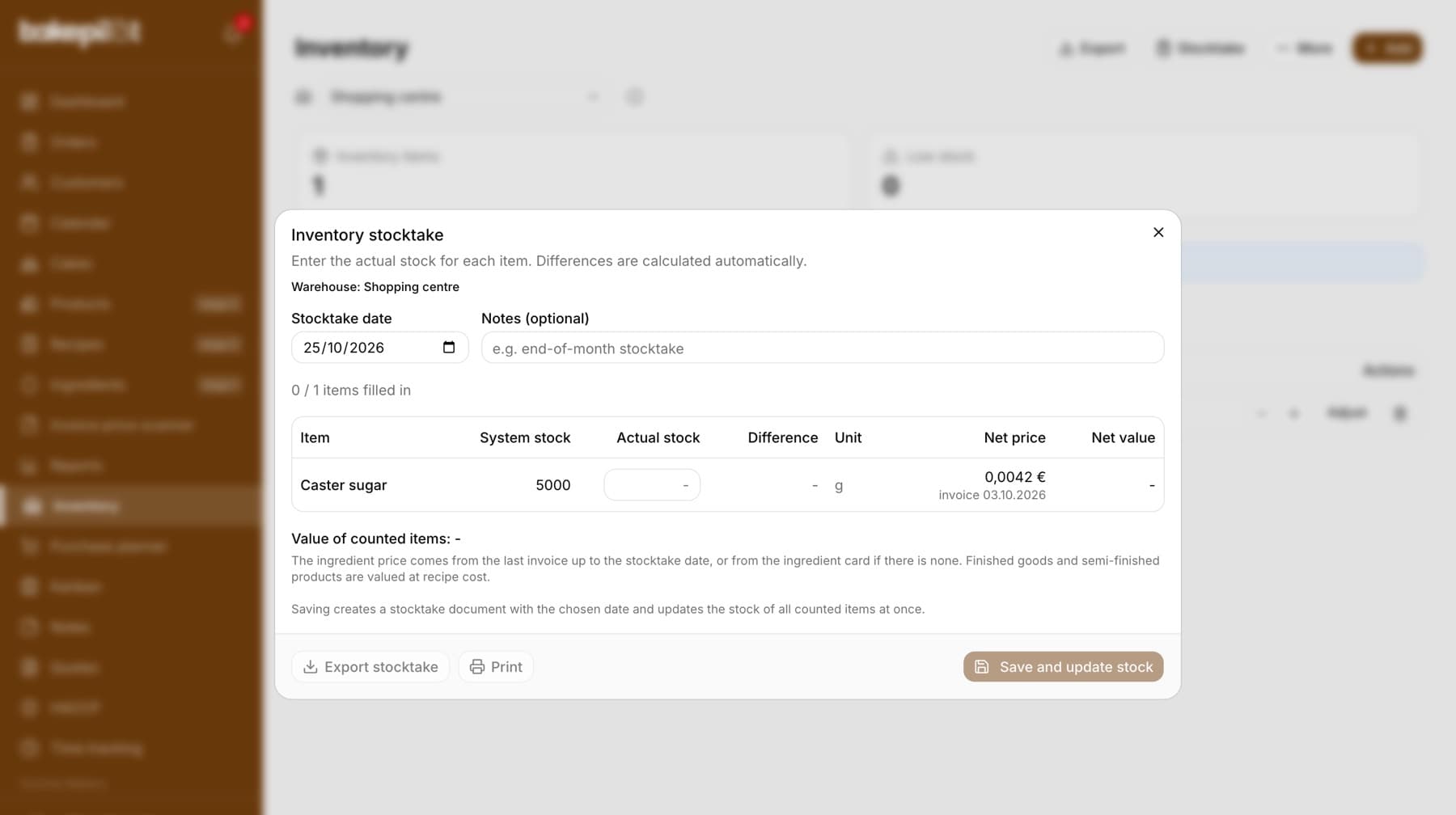
- The export, the printout and the stocktake document have a “Warehouse: …” line with the warehouse name in the header
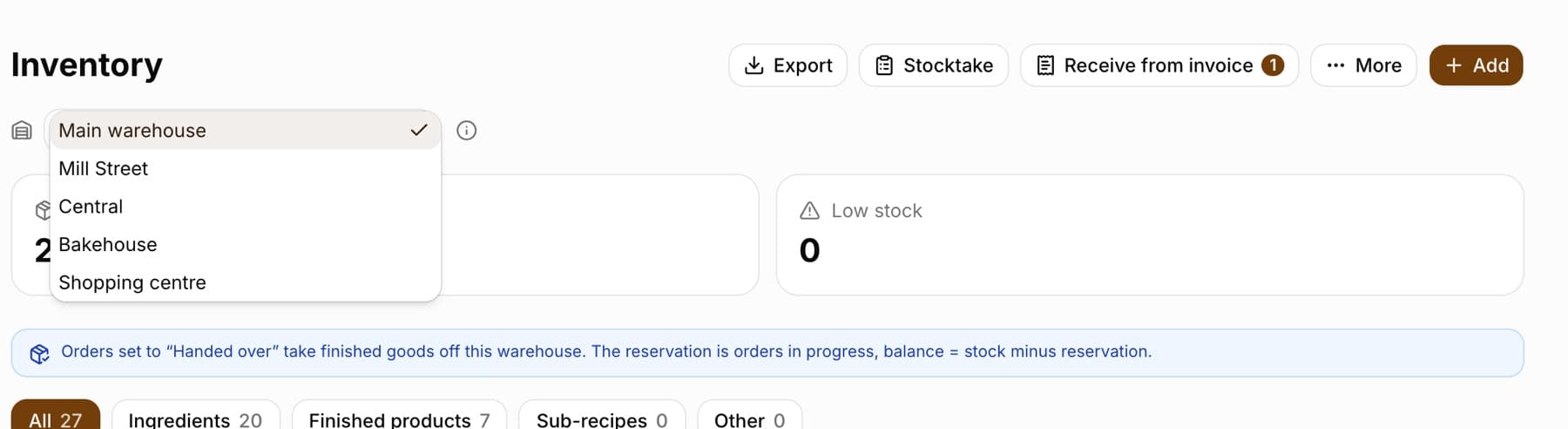
Tip: The “i” icon next to the list (“How the warehouses differ”) briefly reminds you how a branch warehouse differs from the main one.
Items, adjustments and low stock in a branch
In the selected branch the same buttons work as in the main warehouse: “Add” (ingredient, finished product or sub-recipe), “Import from ingredients”, “-” and “+”, “Adjust”, the minimum stock and deleting items. The “Add inventory item” window shows below the title the branch the item will go to (“Warehouse: …”). The same ingredient can have a separate item in the main warehouse and in each branch.
- “Low stock” in the summary counts the items of the selected warehouse
- The “Low stock” card on the dashboard shows the warehouse that opens by default: for staff assigned to a branch - their branch (with the branch name in the title), for everyone else - the main warehouse
- “Receive from invoice” is only in the main warehouse
- “Transfer notes” (in the “More” menu) shows transfers from and to the selected warehouse, and “Transfer” is available wherever you have somewhere to move goods to
Branch stocktake
“Stocktake” counts the warehouse that is selected: in the “Inventory stocktake” window you see “Warehouse: …” below the description, and “Save and update stock” changes the stock only in that warehouse. “Stocktake history” shows the documents of the selected warehouse.
- INW/number/year numbering is shared by the whole company, so the history of one branch may have gaps in the numbers - the missing numbers are stocktakes of other warehouses
- Prices on the stocktake date are calculated the same way as in the main warehouse (last invoice up to the stocktake date, ingredient card, recipe cost)
Staff assigned to a branch
A staff member assigned to branches in Settings (article “Staff assigned to branches”) sees their branch warehouse as soon as they open “Inventory”. The picker shows only their branches and the main warehouse.
- In their branch warehouses they work as before - according to their role (adding, adjusting, stocktaking)
- They can only view the main warehouse: it has the note “(view only)” on the list, above the table they see “You can only view this warehouse. You change stock levels in your branch warehouse.”, and the buttons for changes are hidden
- Exception: in the main warehouse they have “Transfer” in the “More” menu - that is how they receive a delivery from production into their branch
- The administrator and staff without an assignment see all branches and can change any warehouse
Frequently asked questions
I do not see the warehouse picker. Why?
The picker appears on the Mistrzowski plan when “I have several sales points” is ticked in Settings, in the “Sales points” section. Until you add a sales point, the list contains only the “Main warehouse”.
Can I delete a branch that has a warehouse?
No - a branch with inventory items or stocktakes can only be deactivated. Its warehouse then stays on the list with the note “(inactive, view only)” as long as it holds goods.
How do I move goods from the main warehouse to a branch?
With a transfer note (MM): in the main warehouse click “More” → “Transfer”, choose the branch in the “To warehouse” field, enter the quantities and click “Save transfer”. The stock goes down in the main warehouse and up in the branch. Details in the article “Transfer between warehouses (MM)”.