
Driver sheet
Printing the delivery sheet for the day: addresses, phones, items, amounts to collect and space for a signature.
Last updated:
What is on the sheet
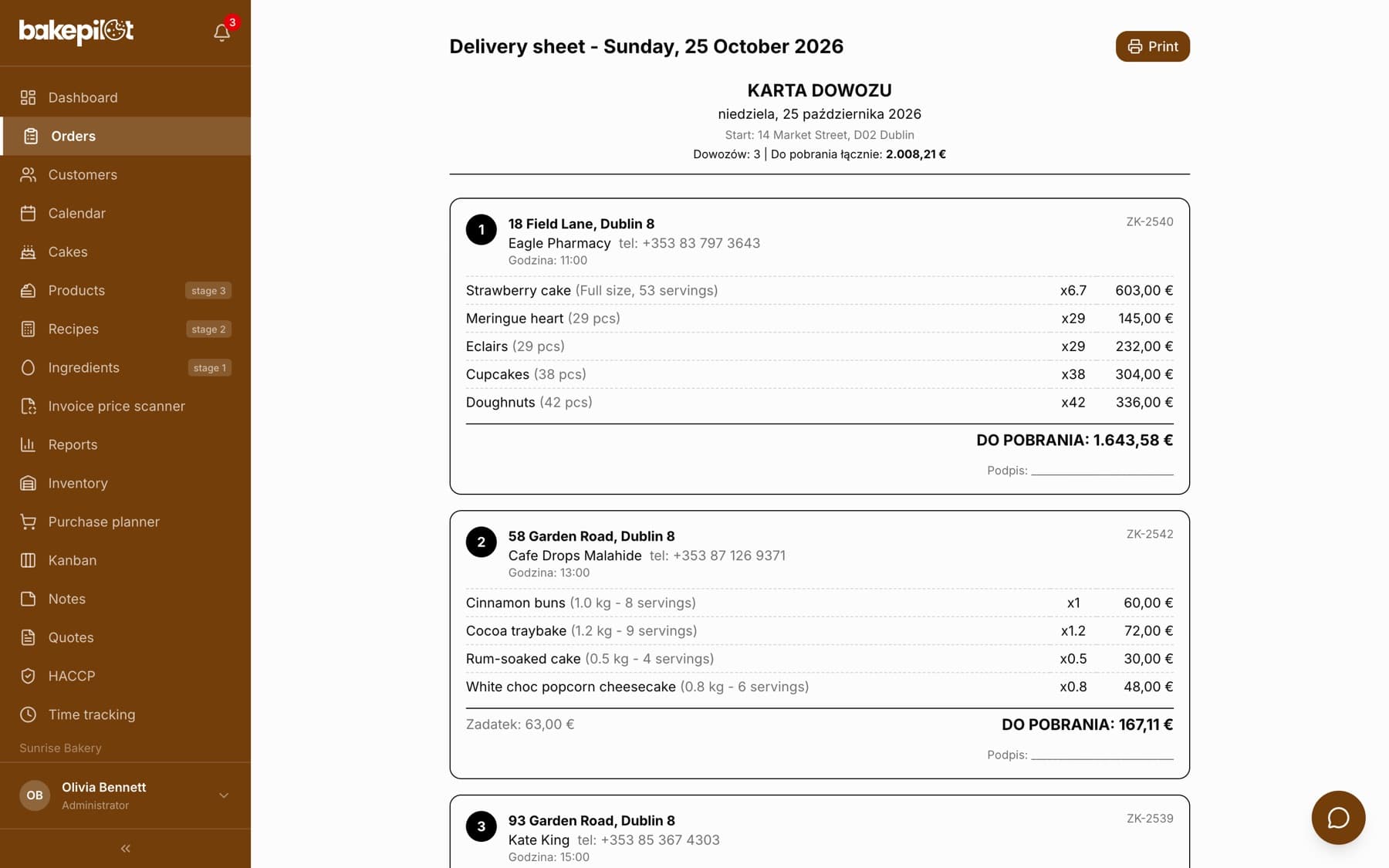
In the “Deliveries” tab, in the daily view, click “Print sheet” - a new browser tab opens with the “KARTA DOWOZU” (delivery sheet) document for the chosen date. At the top there is the starting address, the number of deliveries and the total amount to collect. Each delivery is a separate box with the number, address, customer and phone, delivery time, items with quantities and amounts, the delivery cost, deposit, the amount to collect (or a paid note), order notes and a signature line. The “Print” button opens the print window, where you can also choose to save as PDF.
- A numbered list of deliveries in the order of the delivery list
- Address, customer, phone and delivery time
- Items with quantities and amounts - to check at handover
- Delivery cost on its own line when the order has one - it is already included in “DO POBRANIA”
- The amount to collect after the deposit, or a paid note
- Order notes and space for the customer's signature
Tip: In the weekly and monthly views there is a printer icon next to each day's header - it opens the delivery sheet for that day without switching the view.
After the delivery
You set the “Handed over” status directly in the “Deliveries” tab - every delivery card has a status badge with a drop-down list, so the driver (or you) can tick off deliveries as they go, stop by stop. Handed-over deliveries move to the bottom of the list, and their stops in “Route order” turn green. BakePilot does not record collected cash separately - the amount on the sheet is for the driver to settle with the cash register, and any deposit is recorded in the order, in the “Deposit” section.
- You change the status to “Handed over” right on the delivery card
- Handed-over deliveries drop to the bottom of the list - you can see what is left to deliver
- The amount to collect is the basis for the driver's cash settlement
Frequently asked questions
Is the sheet printed in the optimized route order?
No. The printout shows deliveries in the order of the list, regardless of the “Route order” panel. The driver takes the driving order from Google Maps or from the panel on the screen.
Can I save the sheet as PDF and send it to the driver?
Yes. After clicking “Print”, choose saving to PDF instead of a printer in the print window and send the file to the driver.