
Invoice price scanner - update prices from a photo of an invoice
Take a photo of a wholesaler's invoice and BakePilot reads the lines and updates your ingredient prices, with no retyping.
Last updated:
What it is for
Wholesale prices change from one delivery to the next. Correcting the price of every ingredient by hand after each invoice takes time, and one slip is enough to distort a recipe's cost. The invoice price scanner does it for you: you take a photo of the wholesaler's invoice (or upload a PDF), and BakePilot reads the lines and shows which ingredients went up and which went down. All you do is check and confirm.
- No more retyping prices after every delivery
- Reads the name, quantity and net price after discounts from every line
- Matches lines to your ingredients by EAN code, and when the code is unknown, suggests an ingredient by name for you to confirm
- Once confirmed, recipe costs recalculate on their own
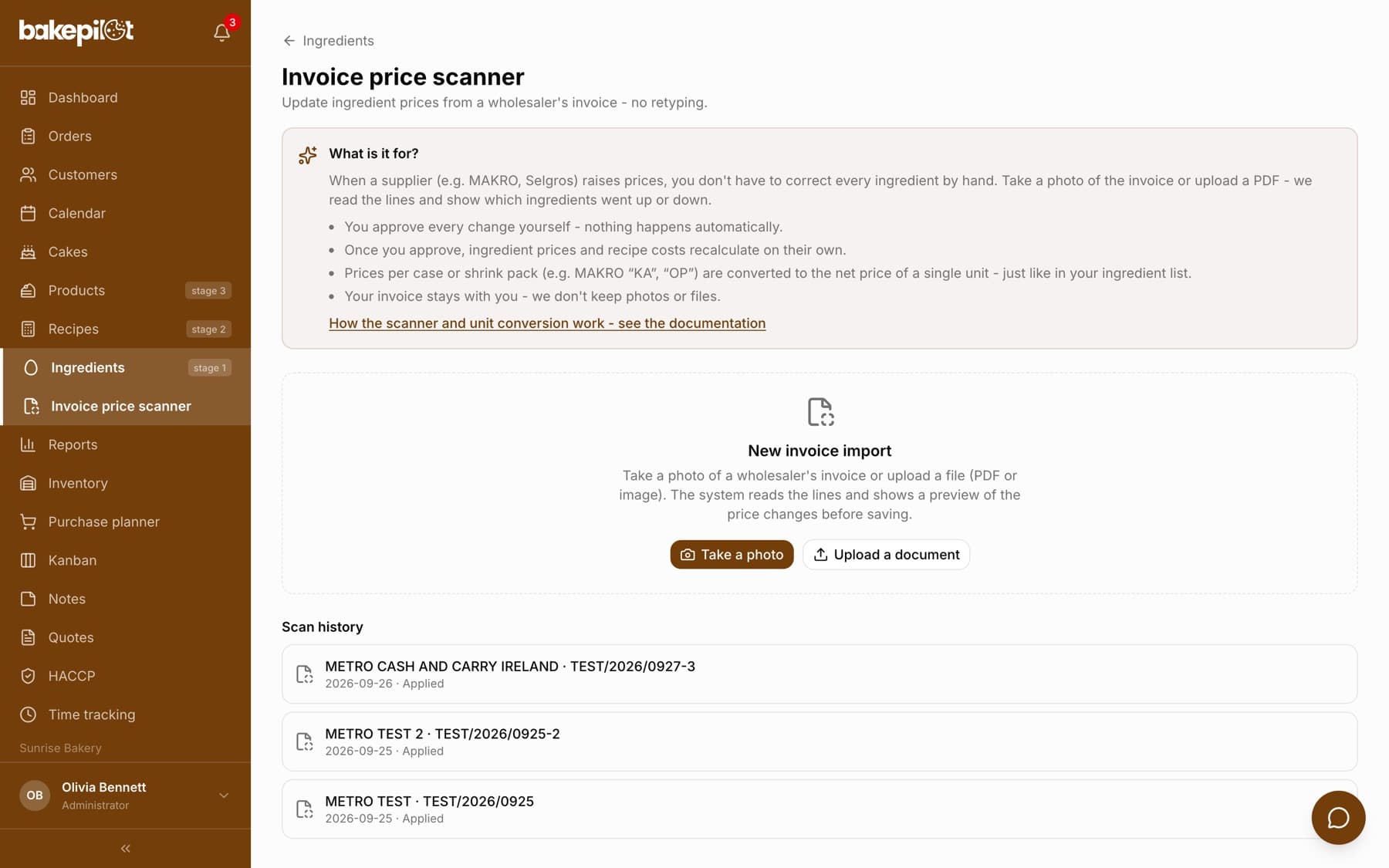
How it works step by step
You will find the scanner in the Ingredients module, under the “Invoice price scanner” button. Take a photo of the invoice with your phone camera or upload a file (a photo or a PDF). The app reads the lines and shows a preview: for every recognized line you see the old and the new price. Lines that are not in your database yet can be assigned to an existing ingredient or added as a new one with a single click. Nothing changes automatically: you accept, correct or skip each line.
- Take a photo with the camera or upload a photo/PDF of the invoice
- Preview of the changes line by line - old price → new price
- Assign an unknown line to an ingredient or add a new one
- Confirm - ingredient prices and recipe costs update on their own
Tip: The first time you import a given product, the line is usually “unmapped” (we do not know its EAN code yet). Once you assign it to an ingredient, later invoices with the same code are matched automatically. After you confirm, recipes that use these ingredients (including recipes that use them in sub-recipes) recalculate on their own - you do not need “Recalculate all”.
Ingredient suggested by name
When a line has no barcode we already know from earlier invoices, the scanner looks for the ingredient by name and puts it first in the “Assign to ingredient” list. The suggestion is not accepted on your behalf, though: until you confirm it, the line will be skipped. You can see this right next to the line - the note changes from “Suggested by name - check it and confirm with the tick button, otherwise the line will be skipped” to “Suggested by name - confirmed”.
- The suggestion is first in the “Assign to ingredient” list, but you confirm it yourself with the tick button
- Short names must match in full, and numbers and percentages in the name (e.g. 30%, 500 g) must agree
- When several ingredients fit a line equally well, there is no suggestion - you choose by hand
- Once confirmed, the price is calculated exactly as with a barcode match
Tip: Instead of the suggestion you can pick “Create a new ingredient” or “Skip this line” - both options are in the same list.
The unit on the invoice decides what the price refers to
Wholesalers write units of measure in dozens of ways, and the unit decides what the price in a line means. When the unit is a kilogram, gram, liter or milliliter, the price refers to that unit - the scanner converts it to the price of your supplier's package. Any other unit (piece, bag, pack, bottle, carton, shrink pack, tray) means a price per package, and then the weight of that package is needed.
- “KG”, “kg.”, “KILOGRAM”, “G”, “DKG”, “L”, “LITR”, “ML” - price per unit, converted to the package (a 10 kg bag of blueberries at 17.34 PLN/kg is 173.40 PLN per bag)
- “SZT”, “OP”, “BT”, “WOR”, “KA”, “ZG”, “TR” - price per package
- The scanner reads the package weight from the line name: “DIAM.CUKIER 25KG KRYSZTAL WOR” is a 25 kg bag of sugar, not a price per kilogram
- It also understands “5 KG”, “600G”, “0,5 l”, “a 10kg”, multipacks like “10x1kg” (10 kg in total) and entries like “120ML 50SZT” (50 pieces of 120 ml)
- “330G+30G” counts as 330 g - the free extra does not raise the package weight
- Dimensions and markings such as “44CMX150M” or “typ 650” are not treated as a weight
- The purchased quantity is stored in packages: 10 KG with a 10 kg package is one package, not ten
Tip: The message “The package weight (10 g/ml) looks like it was entered in kg without converting to grams…” means the ingredient's supplier has 10 g stored where it should say 10 kg - usually an old entry from before the form changed. You can fix it without leaving the preview: next to that line there is a “Package weight (kg)” field - enter 10 and click “Save”. The same rule applies in the supplier window on the ingredient card (the pencil next to the supplier, or “Add supplier”): you enter the weight in the package unit, so with “kg” a 25 kg bag is 25, and “Net price/kg” under the fields shows right away whether the number is right. When the weight is missing altogether, you fill it in the same field in the preview - described below.
“units per case” right in the import preview
When the invoice gives the price of a carton or shrink pack and we do not know how many pieces it holds, a “units per case” field with a “Save” button appears next to the line in the preview. It means the contents of ONE case, not how many cases you bought - the hint under the field says so directly: “Contents of one case, not the number of cases bought”. You enter the number of pieces and the price is converted per piece straight away - without leaving the preview or opening the ingredient card. Under the field you then see what happened, e.g. “Invoice price divided by 12 pcs.”.
- In the import preview, find the line with the case warning
- Enter the number of pieces in the “units per case” field (a case of 8 butter blocks = 8, no matter how many cases you bought)
- Click “Save” - you will see “Price converted per unit”
- Confirm the line with the tick button and apply the changes
- The number is also saved at the supplier on the ingredient card, so later invoices convert on their own
- The field appears only on a line assigned to an ingredient, in an import that has not been applied yet
- The allowed range is 2 to 1000 pieces
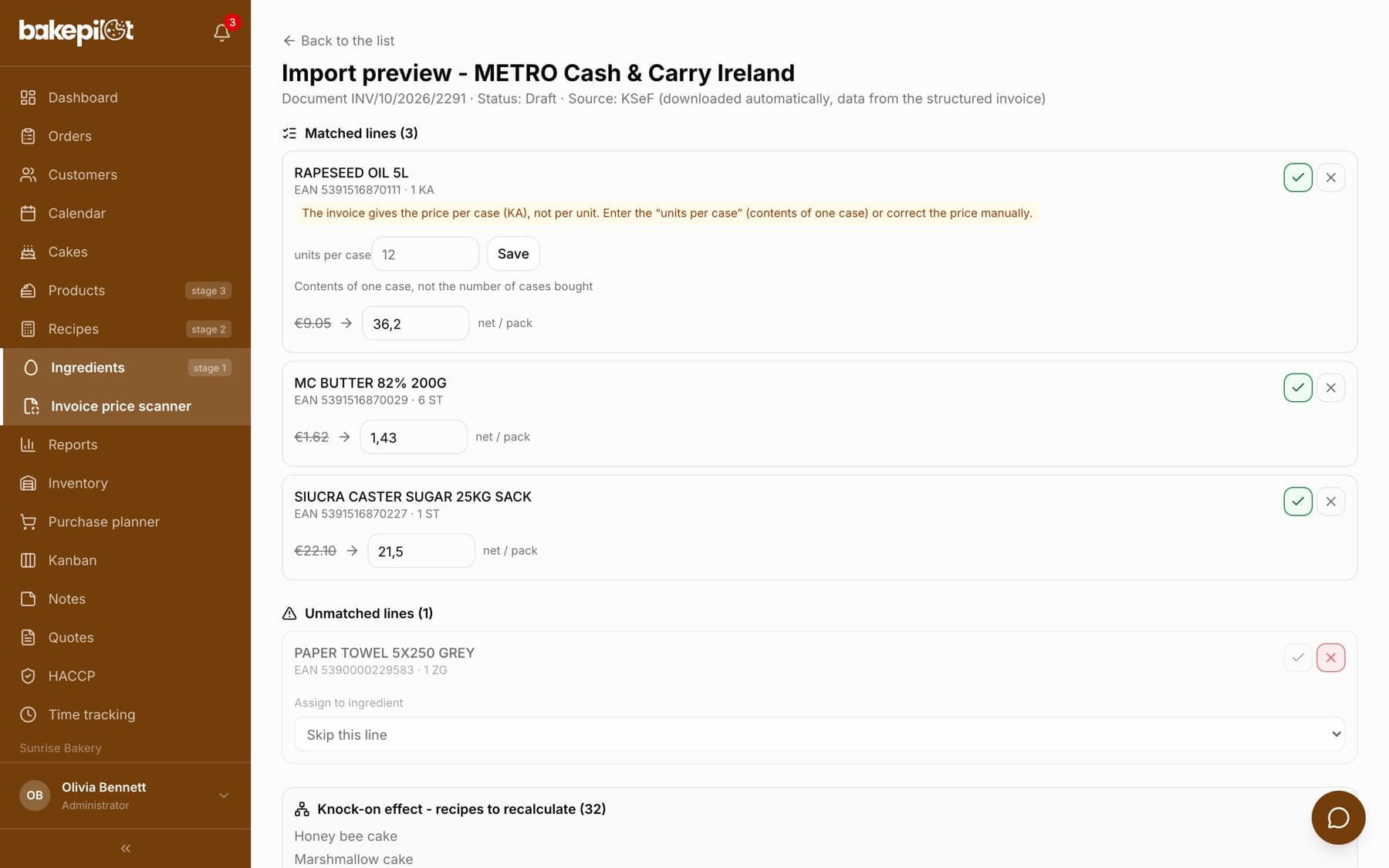
Tip: On the ingredient card the same field is called “Units per case” - here you have it at hand, next to a specific invoice line.
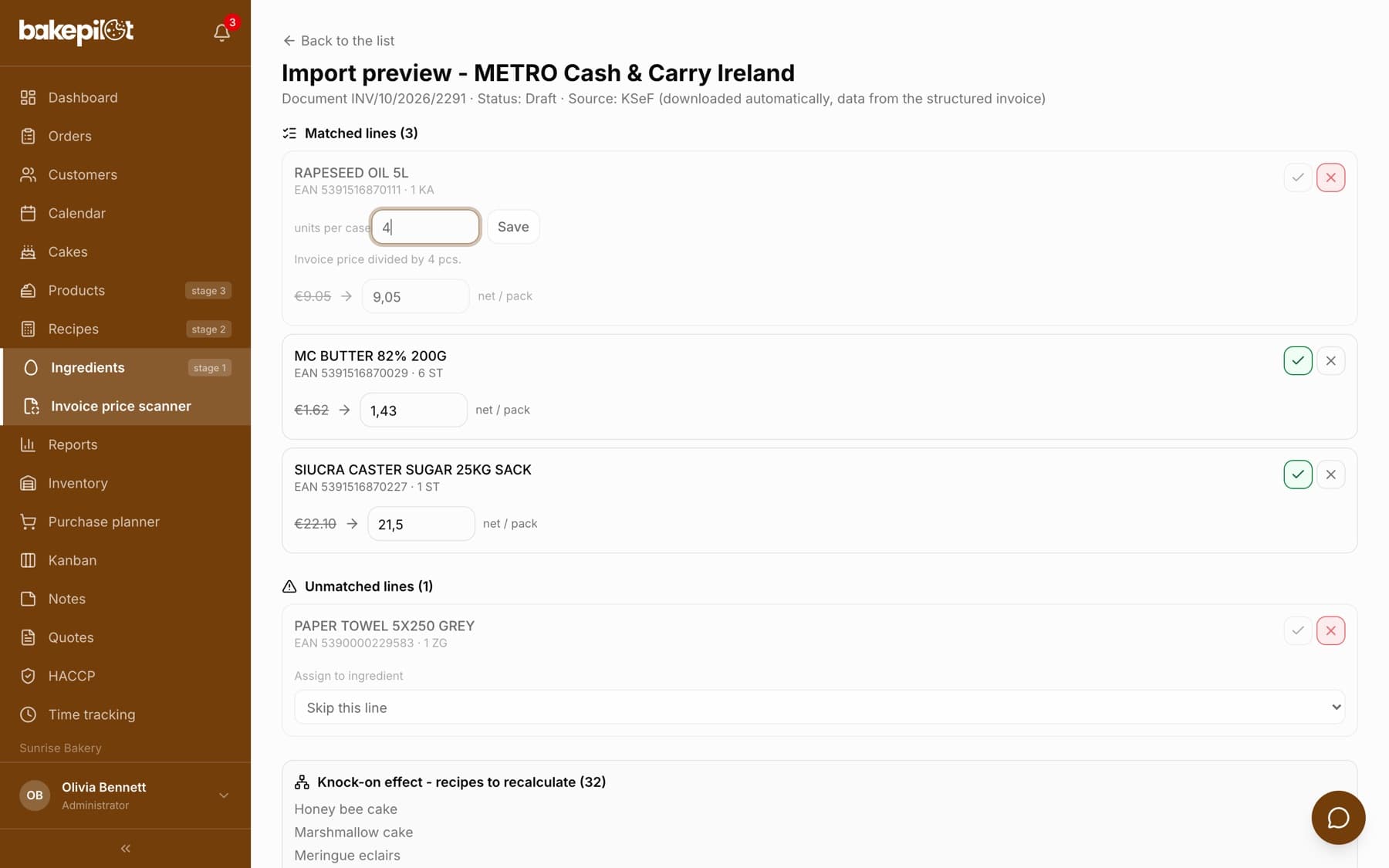
After you enter the number of pieces
After you click “Save”, the warning disappears, “Invoice price divided by 4 pcs.” appears under the field, and the new price is the price of one bottle. The number stays saved at the supplier, so on the next invoice with this oil the scanner converts the case itself and does not ask again.
“Package weight” on an invoice line
The second gap you can fill without leaving the preview is the package weight. It appears when the invoice gives a price per kilogram or liter but the ingredient's supplier has no package weight entered - so it is unknown what one package costs. Next to the line there is a “Package weight” field with the supplier's package unit in brackets, e.g. “Package weight (kg)”, with a “Save” button, and below it a summary, e.g. “Invoice price converted to a package of 25 kg.”.
- Enter the weight in the unit shown in brackets, just like in the supplier window: with “(kg)” a 25 kg bag is 25, with “(l)” a 0,5 l bottle is 0,5, with “(g)” a 500 g pack is 500
- The weight must be between 1 g and 100 kg; outside that range you will see “The package weight must be between 1 g and 100 kg (for liquids 1 ml to 100 l).”
- The weight is saved at the supplier on the ingredient card, so later invoices convert on their own
- A line asks either for “units per case” or for “Package weight” - never both at once
Tip: The fix applies at once to all lines of this invoice that point to the same ingredient source - you do not need to enter it for each one separately.
A line that cannot be calculated is skipped
The scanner never guesses a price. When something is missing - the package weight, the number of pieces per case, or the package unit does not match the unit on the invoice - the line gets a warning in a yellow box and is not selected for confirmation. After you apply the changes, such lines are listed by name with the reason in the “Skipped without a price change” section.
- “The invoice gives the price per case (KA), not per unit. Enter the “units per case” (contents of one case) or correct the price manually.”
- “The invoice gives the price per kg, but the source has no package weight. Add the package weight on the ingredient source.”
- “The invoice gives the price per kg, but the source package is in “szt”. The price cannot be converted - check the package unit on the ingredient source.”
- “The line name describes a 25000 g package, but the ingredient source has 1000 g. Correct the package weight on the source or the price manually - otherwise the package price will become the price per kilogram.”
- A price several times different from the current one also gets a warning - it usually means the wholesaler changed the package
Tip: Once you fill in the missing data and the warning disappears, the line still waits for your confirmation - the app does not tick it for you.
After confirming: the invoice summary
When you go back to a confirmed invoice (Invoice price scanner → scan history), you see a read-only summary rather than a list to fill in. At the top is the green “Changes are saved” bar with the date and counters, and below it every line with what happened to it. This invoice can no longer be changed - you correct prices on the ingredient cards.
- “Ingredient price updated: …” - the price was applied, and the new net price per package is shown next to it
- “Assigned to an ingredient: …” and “New ingredient created: …” - the line went to the chosen or a new ingredient
- “Price unchanged: …” - the invoice price was the same as before, so there was nothing to change
- “Price not accepted: …” - in yellow, the reason, the invoice price and the “Complete it on the ingredient card” link
- “Skipped” - a line you did not assign to an ingredient (e.g. paper towels or bags)
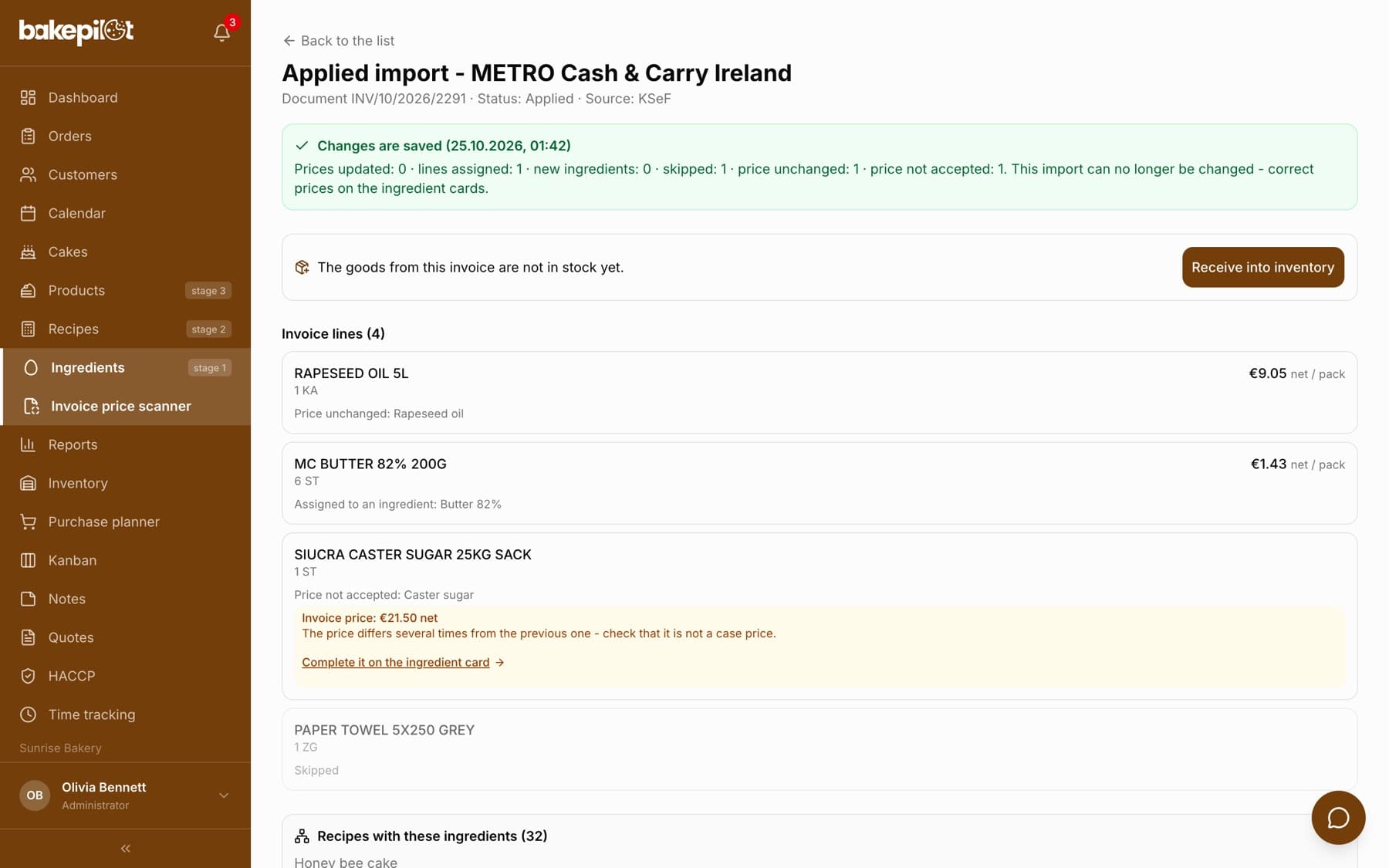
Tip: Under the green bar there is a “Receive into inventory” button: goods from the invoice go into stock, with cases and packages converted into inventory units, after a preview. Details in the “Stock levels” article, in the section on receiving goods from a purchase invoice.
An invoice from one supplier does not touch the others' prices
You sometimes buy the same ingredient from two wholesalers, and each has its own price and its own package. Confirming an invoice updates the price only for the supplier the invoice comes from. If a line comes from a different wholesaler than the stored source, the scanner adds a new source to the ingredient instead of overwriting the price of the existing one.
- The ingredient's other suppliers' prices stay untouched
- On the ingredient card you will then see two sources and the price of each
- With the “Automatic (recommended)” pricing method, the ingredient price is the average price per kg of all active suppliers
Cases, shrink packs and the price per piece - what comes from what
Wholesalers often sell in bulk packs: on a MAKRO invoice butter has the unit “KA” (carton), milk “OP” (shrink pack), jam “SL” and flour “TR” (tray). The price on such a line is the price of the whole bulk pack - not of a single block. In BakePilot ingredient prices are always kept per single retail package (e.g. a 200 g block of butter), so the scanner converts the invoice price to a price per piece. The order is: first the price per piece after discounts taken straight from the invoice, then the number of pieces given in the product name (“MAKA 10X1KG”), and finally the number from the “Units per case” field stored at the supplier. If none of the three is known, the scanner does NOT guess - it skips the line and shows a warning next to it.
- Invoice: 10 cases of butter at 33.26 PLN (case = 9 blocks) → the scanner suggests 3.70 PLN per block
- The price per piece after discounts from the invoice comes first - it is the most accurate value
- When the wholesaler does not print it: bulk pack price ÷ number of pieces
- Number of pieces unknown → line skipped with the warning “The invoice gives the price per case”
- Enter “units per case” once on the line in the import preview (or “Units per case” when adding a supplier on the ingredient card) - later invoices convert on their own
- The price per kg is calculated from the package weight, and the gross price from the VAT rate of the line read from the invoice - flour or sugar at 5% no longer get the default 23%
Tip: If the invoice price is several times different from the current one, the scanner also flags the line with a warning and does not confirm it automatically. It usually means the wholesaler changed the package - check before you accept the price.
MAKRO invoices from KSeF: a piece on the invoice may be a case
MAKRO's paper specification has a “szt. w op.” (pieces per pack) column, but MAKRO does not send it to KSeF (Poland's National e-Invoicing System). An invoice from KSeF keeps only the unit, quantity and price - and the unit “ST” (piece) sometimes means one tub of cream and sometimes a case of eight butter blocks. A real example: “LACIATE MASLO EXTRA 200 G” (200 g butter), quantity 6, unit ST, price 45.76 PLN, value 274.56 PLN. That is 6 cases of 8 blocks, not 6 blocks - without this knowledge a 200 g block would cost 45.76 PLN, i.e. 228.80 PLN per kilogram.
- BakePilot has a catalog of MAKRO packages (product barcode → number of pieces per pack), taken from MAKRO's specifications
- A KSeF invoice from MAKRO checks every line against the catalog: the butter from the example comes in as 45.76 PLN ÷ 8 = 5.72 PLN per block, i.e. 28.60 PLN per kilogram
- The catalog also works the other way: 1 kg of vanilla sugar with the unit “KA” is a single piece at MAKRO, so the scanner does not ask about a case
- Prices per kilogram and liter (“KG”, “L”) are not divided - they are a price per measure, not per package
- Product not in the catalog? Enter “units per case” once on the line in the import preview - the number is saved at the supplier, and from then on the case price is divided by that number also for the “ST” unit, when only the divided price matches the previous one
- The catalog holds only the barcode, the product name and the number of pieces - no prices and no buyer data
Tip: The simplest test: look at the price per kilogram on the ingredient. Butter at 228 PLN/kg or milk at 33 PLN/l means the case price went in as the price of one piece. On the next invoice from this supplier, enter the number in the “units per case” field on the line in the import preview, and correct the current price by editing the ingredient in the Ingredients list.
Privacy and security
Your invoice stays with you. After the lines are read we do not keep the photo or the file - we store only the data needed to update prices (name, quantity, price) and a short scan history for reference. By default the scanner is visible to the Administrator and the Accountant - you can change this in the permissions matrix in Settings (the “Invoice price scanner” permission in the Invoices module).
- The photo/PDF is not kept after it is read
- We store only the line data and the scan history
- Access by default for the Administrator and the Accountant
- This does not give the Accountant ingredient import from a file - that is a separate “Import” permission in the Ingredients module
Frequently asked questions
Which wholesalers' invoices does it work with?
Any - the scanner reads typical invoices and specifications, e.g. from MAKRO or Selgros. What matters is how legible the document is: the sharper the photo, the more accurate the reading. If the total of the lines does not match the total on the invoice, the app flags it so you can check more closely.
Do prices change automatically?
No. The scanner only suggests changes - you have to confirm, correct or skip every line. Ingredient prices update only after you click “Apply changes”, and the costs of recipes that use them recalculate on their own.
Does the scanner take invoice discounts into account?
Yes. We take the price after discounts, also when the wholesaler records the discount as a negative amount in a separate column - MAKRO does this, among others. If the discount is already included in the unit price, we do not deduct it a second time: the app checks whether quantity times price matches the line value.
Which plan includes the invoice price scanner?
The Mistrzowski (Master) plan. It is a feature with AI reading, available as a subpage of the Ingredients module.
Why does the price in the preview differ from the price on the invoice?
Because the invoice shows the price of a bulk pack (a case or shrink pack), while BakePilot keeps prices per single retail package. The scanner converts the price per piece - from the “price per piece after discounts” column, from the number of pieces in the product name, or from the “Units per case” field at the supplier. When it knows none of these numbers, it leaves the line skipped with a warning instead of entering the case price. You can always correct the price by hand before confirming.