
KSeF integration - a certificate in a few clicks
Connect your company to KSeF without a qualified signature. The Trusted Profile (Profil Zaufany) is enough.
Last updated:
What KSeF is
KSeF (Krajowy System e-Faktur, Poland's National e-Invoicing System) is the government system through which companies in Poland issue, send and receive electronic invoices. BakePilot supports it from the inside: you send sales invoices to KSeF and receive cost invoices from wholesalers, without copying data into another program.
- The government e-invoicing system, mandatory for successive groups of companies
- The Polish Ministry of Finance stores and confirms every invoice
- Sales invoices sent straight from BakePilot
- Invoices from wholesalers received without taking photos
Before you start - what you need
You do not need to buy a qualified signature to connect to KSeF. The Trusted Profile (Profil Zaufany) is enough. It is a free signature available to anyone with a Polish bank account or a profile on gov.pl. You do the whole process once, and it takes a quarter of an hour or so.
- Trusted Profile (free), fully sufficient for a sole proprietorship
- Or a qualified signature or a qualified company seal, if you already have one
- The company NIP filled in under Settings
- The sales currency set to Polish zloty, since KSeF works only for PLN
Tip: You will find the configuration in the “Invoices” module under the “Settings” button, in the “KSeF integration” section. It is a one-time task; after that, BakePilot takes care of everything.
Environment and authorization method
In the “KSeF integration” section you first choose the “Environment”, “Test”, “Demo” or “Production”, and then the “Authorization method”: “KSeF certificate” or “Token (until 31.12.2026)”. After choosing the certificate, the “Connect to KSeF in a few minutes” wizard appears below. Save the environment choice with the “Save settings” button before you generate the file.
- “Test”, for learning, invoices have no legal effect; the Trusted Profile does not work here, because the environment has no real data on company owners
- “Demo”, real login, invoices still have no legal effect; good for checking the whole path
- “Production”, works for real, invoices are legally effective
- A certificate issued in one environment does not work in another; after switching, you go through the wizard again
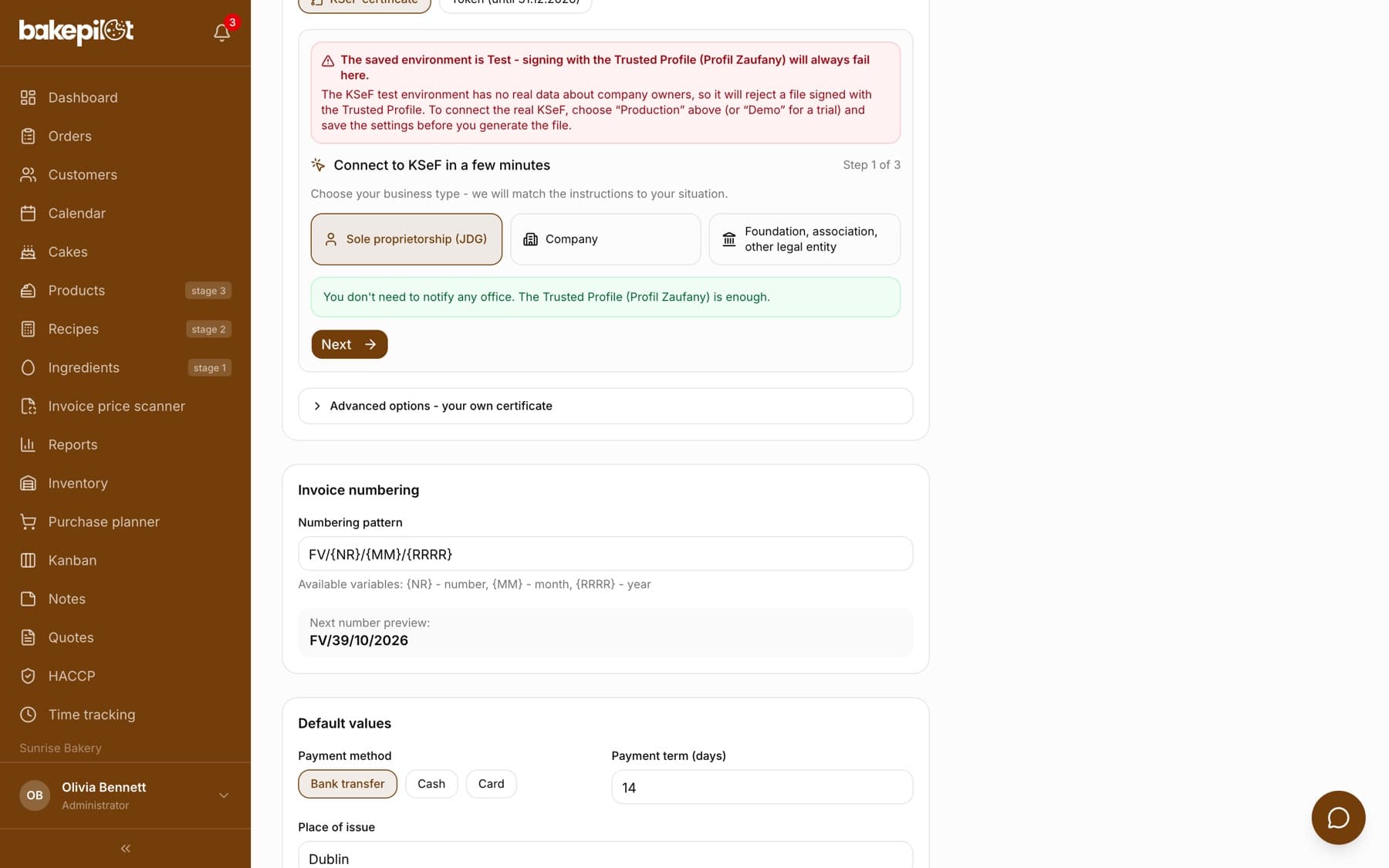
The certificate wizard step by step
The wizard has three steps and guides you through them. You do not need to understand what happens underneath; just go through the screens. The authorization file is valid for 8 minutes, and the counter in step two shows how much time is left.
- Step 1 of 3: choose “Sole proprietorship (JDG)”, “Company” or “Foundation, association, other legal entity” and click “Next”
- Step 2 of 3: click “Generate authorization file”, then “Sign the file on gov.pl”. The government website opens in a new tab
- On gov.pl, upload the downloaded XML file, sign it with the Trusted Profile (or a qualified signature or seal) and download the signed file
- Return to BakePilot and click “Go to uploading the signed file”
- Step 3 of 3: select the “Signed XML file” and click “Upload signed file”. Issuing the certificate takes a few seconds
Tip: If the 8 minutes have passed, the wizard shows “The authorization file has expired” and a “Generate again” button. Nothing breaks; you just sign a new file.
Who must sign the file
The authorization file must be signed by a person authorized for the company's NIP number. For a sole proprietorship, this is the owner. A signature by anyone else (the accountant, a spouse, an employee) will be rejected by KSeF, even if everything technically goes through in the app. You can send the file to the owner for signing and upload it once you receive it.
- Sole proprietorship: the business owner signs with their Trusted Profile
- Company: the person registered as authorized for the company's NIP signs
- Foundation, association and other legal entity: the same as a company, the organization's qualified seal or a person registered on the ZAW-FA form
- A signature by another person means the request is rejected by KSeF
Sole proprietorship - the shortest path
With a sole proprietorship you do not need to file anything at the tax office. After you choose JDG, the wizard confirms this with the message “You don't need to notify any office. The Trusted Profile (Profil Zaufany) is enough.” You have owner permissions in KSeF automatically, because your PESEL (Polish personal identification number) is linked to the company's NIP.
- No formalities at the tax office
- Owner permissions granted automatically
- The free Trusted Profile is enough
- The whole setup usually takes a quarter of an hour or so
Company, foundation, association - the ZAW-FA notification first
In a company, foundation, association or any other legal entity, KSeF does not know in advance who is entitled to act on its behalf. In the wizard, choose “Company” or “Foundation, association, other legal entity” accordingly; the instructions are the same. That is why the first authorized person is registered with the ZAW-FA(3) form through the e-Tax Office service of the Polish tax administration (podatki.gov.pl). Processing usually takes a few working days, and only then do you go through the wizard. Since 2026, sending ZAW-FA through ePUAP is not effective.
- The ZAW-FA(3) form filed through the e-Tax Office service
- Since 2026, ePUAP is not an effective way to file it
- Once permissions are granted, you return to the wizard and sign the file with the qualified signature of the designated person
- Alternative: the company's qualified seal, in which case ZAW-FA is not needed
Tip: If the company already has a qualified company seal containing its NIP, you can skip ZAW-FA and sign the authorization file with that seal right away.
The certificate renews itself
The KSeF certificate is free and valid for up to two years. After completing the wizard, you see a screen with the expiry date and the message “The certificate will renew automatically before it expires.” You do not need to note anything in your calendar or repeat the procedure. You will find the certificate details (subject, validity dates, fingerprint) in the “Advanced options - your own certificate” section.
- The KSeF certificate costs nothing
- Valid for up to two years
- Automatic renewal before the deadline
- A warning in the settings when 30 or 14 days of validity remain
Sending invoices and statuses
Once the certificate works, a “Send to KSeF” button appears on the page of an invoice with the “Draft” status. The invoice goes to the Ministry of Finance and gets the “Sent to KSeF” status. With the “Check KSeF status” button you fetch the response. After acceptance, the invoice has the “Accepted” status, a KSeF number and a QR code, and the “Download UPO (official receipt)” button saves the official confirmation of receipt.
- Statuses: “Draft”, “Sending to KSeF”, “Sent to KSeF”, “Accepted”, “Rejected”
- “Download UPO (official receipt)” on the invoice page; on the list, “Download UPO (N) as ZIP” for many accepted invoices
- An invoice rejected by KSeF has not been issued: on its page click “Fix and send again”, correct the details and click “Save corrected invoice”. The invoice keeps the same number, goes back to drafts and you send it to KSeF again with the “Send to KSeF” button
Advanced options: your own certificate, tokens and permissions
If you already have a certificate issued outside BakePilot, expand “Advanced options - your own certificate”, upload the certificate file (.crt, .pem, .cer), the private key (.key, .pem) and the password, and then click “Upload and verify”. The “Test the KSeF connection” button checks that the certificate works. Token authorization stops working on 1 January 2027. If you still use it, click “Switch to a KSeF certificate”.
- Uploading your own certificate manually as an option for advanced users
- “Token (until 31.12.2026)”, the old method; the settings show a warning about the end of tokens
- Switching from a token to a certificate simply means going through the wizard
- The “KSeF permissions” panel below the settings lets you grant and revoke permissions for people acting on behalf of the company
Frequently asked questions
Do I need a paid qualified signature?
No. For a sole proprietorship, the free Trusted Profile (Profil Zaufany) is enough. A qualified signature or seal is an option for those who already have one, and a route for companies that want to avoid the ZAW-FA notification.
How much does a KSeF certificate cost?
Nothing. The KSeF certificate is free, valid for up to two years, and BakePilot renews it automatically before it expires.
Can my accountant sign the file?
No. The authorization file must be signed by a person authorized for the company's NIP, which for a sole proprietorship is the owner. A signature by another person will be rejected by KSeF.
I have a company. How long does the ZAW-FA notification take?
Usually a few working days, but the timing depends on the tax office. If you do not want to wait and the company has a qualified company seal with its NIP, you can sign the authorization file with the seal and skip ZAW-FA.
Why doesn't the Trusted Profile work in the test environment?
The KSeF test environment does not contain real data on company owners, so there is no way to confirm that you are the authorized person. For tests with a real login, use the “Demo” environment, and ultimately “Production”.
I issue invoices in euro. Will KSeF work?
No. KSeF supports only invoices in Polish zloty. With a different sales currency, the send button is disabled and labeled “KSeF unavailable” with the currency code.
What if KSeF rejects an invoice?
The invoice gets the “Rejected” status and has not been issued. Most often this is an error in the data, for example a wrong NIP or a missing required field. On the invoice page click “Fix and send again”, correct the details and click “Save corrected invoice”. The invoice keeps its number, goes back to drafts and you send it to KSeF again. The issue date must stay within the period in the invoice number; if that period has already passed, the app will not let you correct the invoice under that number. Write to us or ask your accountant.