
Cake configurator - custom cake orders step by step
The customer builds a cake from your options (flavor, shape, decorations), and the price and portions are calculated automatically. With a portion calculator by diameter.
Last updated:
Why a cake configurator
Custom cakes are rarely the same - a different flavor, a different shape, different decorations. Instead of creating a separate product for every combination, you define the available options once, and the customer (or you, when taking the order) builds the cake step by step. The price and weight are calculated automatically, and you get consistent pricing without doing the math in your head.
- One custom cake product instead of dozens of variants
- Consistent, automatic pricing for every combination
- Fewer mistakes in price and weight
- Available in the Profesjonalny (Professional) and Mistrzowski (Master) plans
How to set up the configurator (Cakes tab)
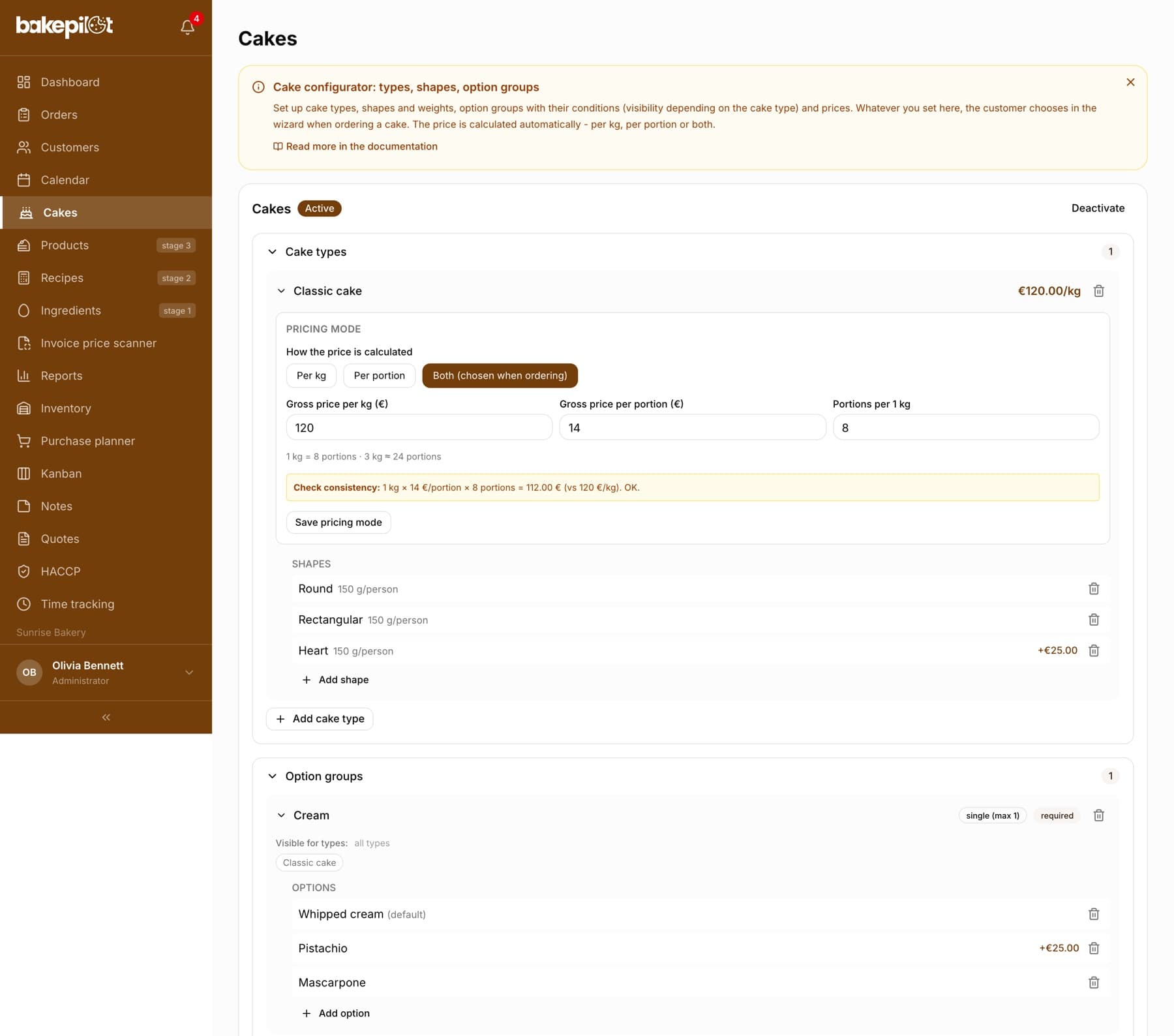
In the “Cakes” tab you set up, once, everything the customer can choose from. You start with “Create template”, then click “Add cake type” (e.g. chocolate, fruit), “Add shape” with grams per person, and “Add option group” - any names you like, such as Preserves, Filling, Decoration, Extras. Each option can have a surcharge. Groups and options can be visible only for selected cake types (conditions), and the choice can be single or multiple with a limit.
- “Create template” - the first step, then “Add cake type” and “Add shape” with grams per person
- A cake type without its own shapes offers four standard ones when ordering: round, rectangular, square and heart (no surcharge, 150 g per person); each shape has its own pictogram in the wizard
- “Add option group” - your own groups with any names and surcharges
- Conditions: a group/option only for selected cake types
- Single or multiple choice with a limit; required groups
Tip: Start with a few basic groups (flavor, filling, decoration). You can expand later - changes show up right away in the order wizard.
Pricing: per kilogram, per portion or both
Each cake type has a “How the price is calculated” field: Per kg (the classic way), Per portion (handy for large cakes) or Both. Depending on your choice, you enter “Gross price per kg (PLN)”, “Gross price per portion (PLN)” and “Portions per 1 kg” - configurator prices are gross, as at the till, and you confirm changes with the “Save pricing mode” button. When placing the order you choose the weight or the number of portions, and the price recalculates on its own, together with the surcharges for the selected options and shape.
- Per kg - price = weight × “Gross price per kg (PLN)”
- Per portion - price = number of portions × “Gross price per portion (PLN)”
- Both - you choose the method when ordering; “Portions per 1 kg” links the two calculations
- Surcharges for the shape and options are added automatically
Portion calculator by diameter (by Marta Mężyńska)
Not sure how many portions a cake of a given diameter will give? The portion calculator is in two places: the full reference table at the bottom of the Cakes tab and a handy calculator in the cake wizard when ordering. In both you choose the number of tiers and the diameters, and the system suggests the number of portions from Marta Mężyńska's table - in the wizard you can insert it straight into the order.
- Full table at the bottom of the Cakes tab, handy calculator in the order wizard
- Choice of the number of tiers (1-6) and diameters in cm
- Suggested number of portions from the table (e.g. 24 cm → 30-40 portions)
- One click sets the number of people in the order
- Calculations courtesy of Marta Mężyńska (@nocnepieczeniecafe)
Tip: The table gives ranges - for pricing we take the lower value, so you never promise the customer more portions than the cake will actually give.
Placing an order with the configurator
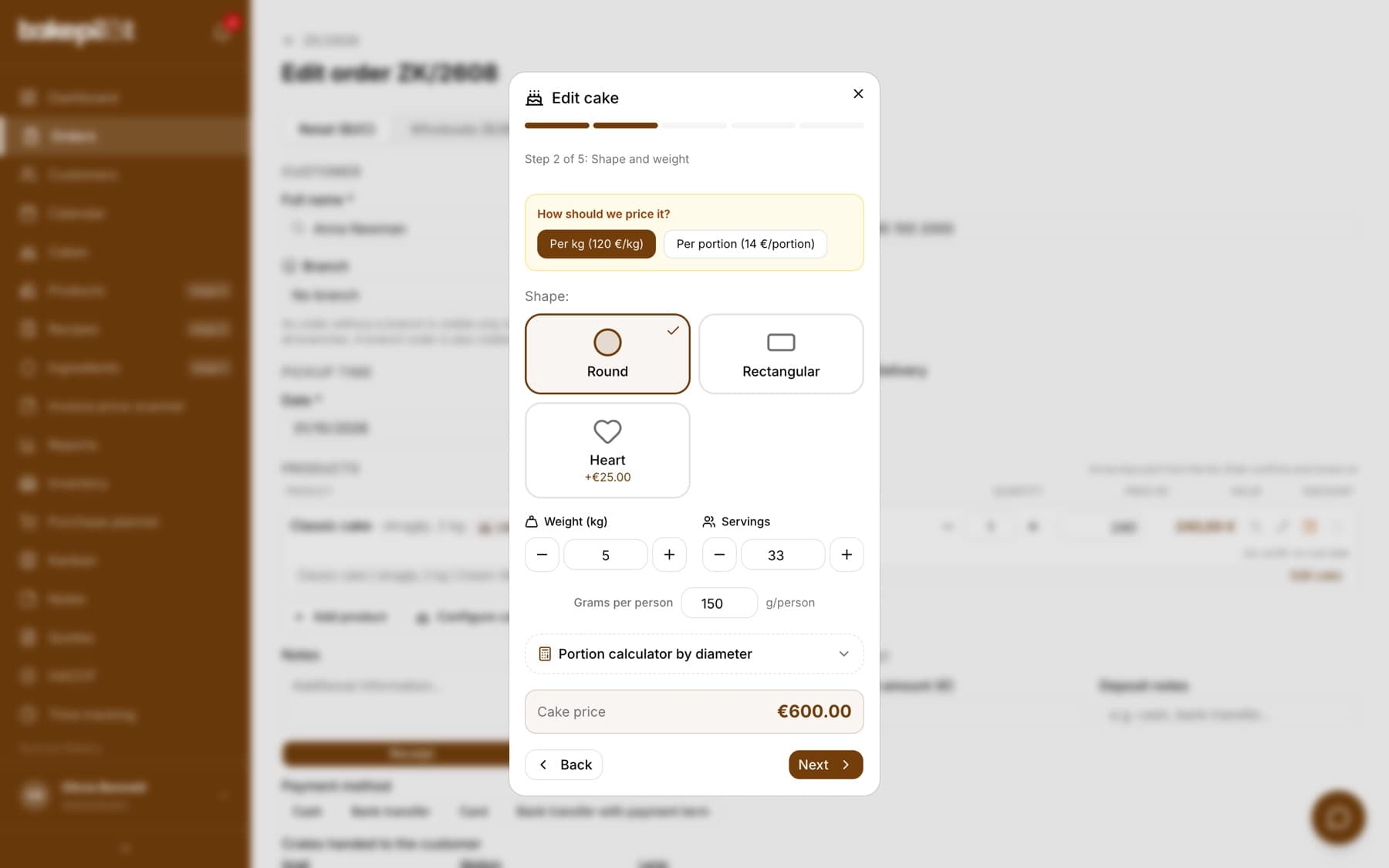
When creating an order, you choose a product with “Custom product (cake configurator)” ticked, go through the steps (type, shape/size, option groups) and see the price as you go. The finished configuration is saved to the order with a full description - production sees exactly what to make, and the invoice shows a clear name.
- Step-by-step wizard with a live price
- Full description of the configuration in the order and on the production Kanban board
- A clear line name on the invoice
- “Notes for the cake” from the inscription step go into the line description, onto the printout and onto the Kanban board
- “Edit cake” next to the line opens the “Edit cake” window with the saved choices - you can change e.g. the weight and click “Save changes”
- When editing, the number of cakes in the line and any note added by hand under the description are kept; the change is then visible in the order's “Change history”
Tip: The configurator calculates the price from the selected options, not from a recipe - it does not show food cost or margin. The “Cakes” tab is visible only to the account administrator. To use the configurator in an order, create a product with “Custom product (cake configurator)” ticked - such a product does not use variants.
Frequently asked questions
Which plan includes the cake configurator?
The Profesjonalny (Professional) and Mistrzowski (Master) plans. The account administrator's menu shows a “Cakes” tab, where you define types, shapes and option groups.
Can I price large cakes per portion instead of per kilogram?
Yes. Each cake type can have its own pricing mode: per kg, per portion or both. You choose the method when ordering, and the price recalculates automatically.
How does the calculator know how many portions a cake will give?
It uses Marta Mężyńska's (@nocnepieczeniecafe) discrete portion table - specific diameters and numbers of tiers have an assigned number/range of portions. We do not guess values outside the table.