
Celebration cake - sizes as variants or a custom order configurator
Two paths: a catalog of sizes (18, 22, 26 cm diameter and a cake priced per serving) through variants, or the cake configurator, where the customer builds a cake from options. When to use which.
Last updated:
Two paths that exclude each other
You can handle a cake in two ways. Path A: a fixed catalog of sizes as product variants - the customer chooses an 18, 22 or 26 cm diameter, and you price large cakes per serving. Path B: the cake configurator in the Cakes tab - when ordering, the customer builds the cake from options (sponge, cream, decoration), and the price is calculated from the chosen elements. A product with “Custom product (cake configurator)” ticked does not use variants.
- Path A (variants): a few fixed sizes, you know the cost and margin of each from the recipe
- Path B (configurator): hundreds of combinations, price from the options, no cost or margin in the wizard
- You can have both: “Chocolate cake” as a product with variants and “Custom order cake” as a configurable product
Path A: the cake recipe
A cake recipe is an ordinary recipe in “Trays” or “Pieces” mode. The number of portions matters: enter how many slices you cut this cake into (for example 16), because this determines how you describe usage in the variants. If you make the sponge and the cream separately, create two recipes - a variant can have several recipes at once.
Path A: turn on “Divisible product” and price suggestions
Create a “Chocolate cake” product in the Celebration cake category with a recipe. On the product card, click “Variant settings”. Tick “Divisible product (cake, tray bake)” - without it, the “Price per portion” mode is locked. In “Price suggestion mode” choose “Percentage markup on cost” and enter the markup, for example 150 (price = 2.5 × cost). From now on, when you enter a variant price you will see a suggestion calculated from the cost.
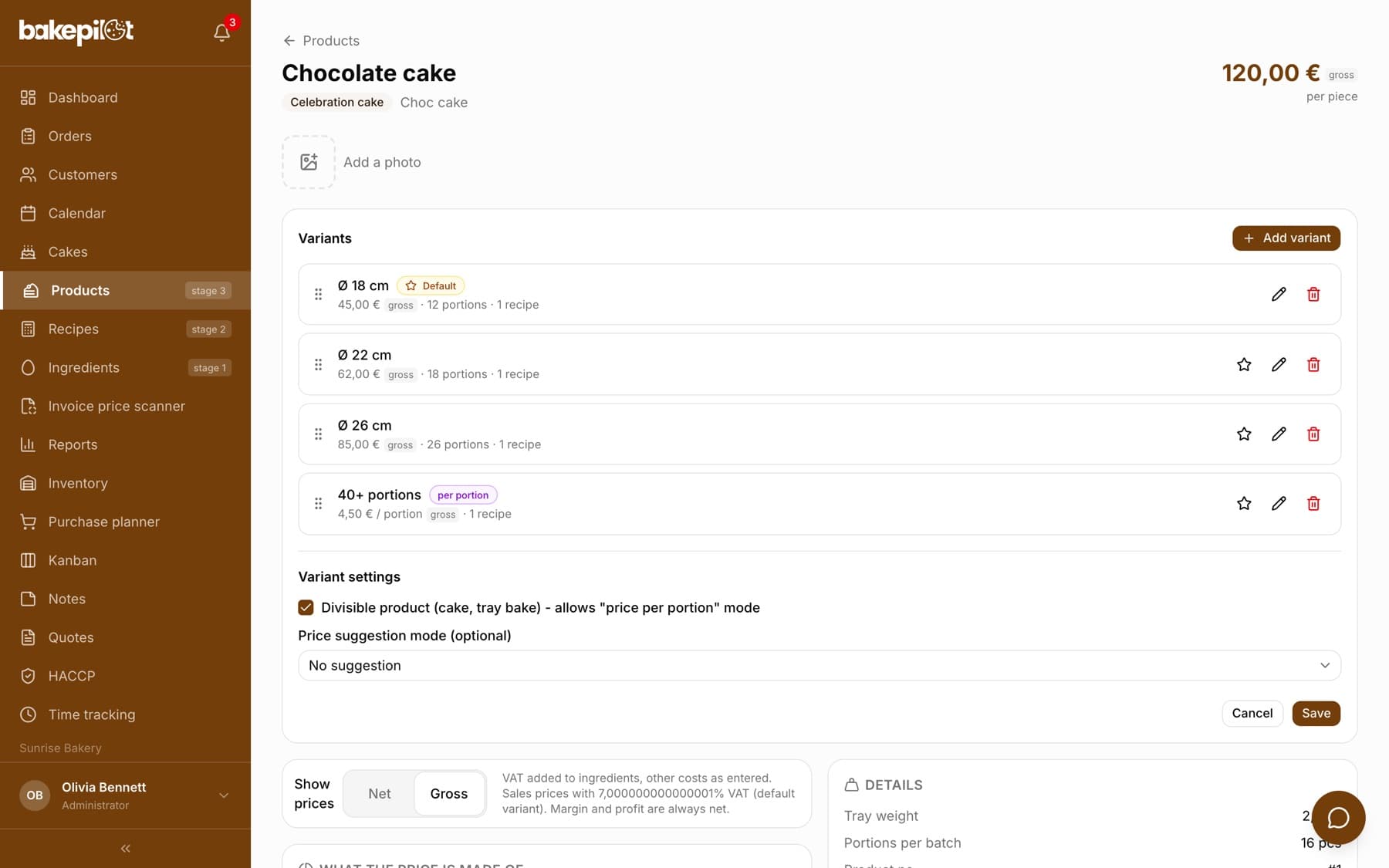
Path A: size variants
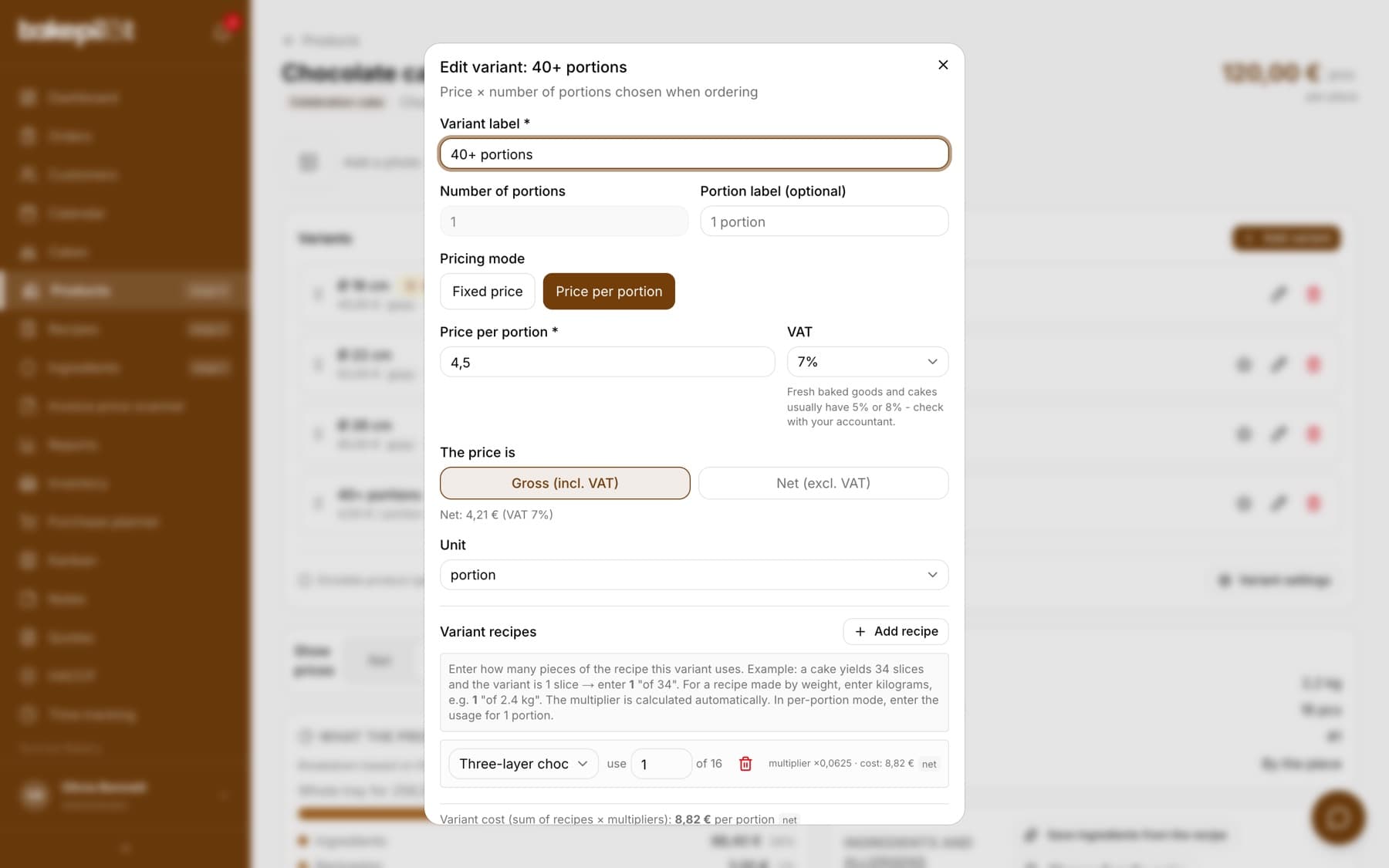
Add a variant for each size: “18 cm / 12 servings” for 189 PLN, “22 cm / 16 servings” for 249 PLN, “26 cm / 24 servings” for 349 PLN. All in “Fixed price” mode, with 8% VAT and the pcs unit. In the variant's recipes, enter the usage: if the recipe is for 16 portions, the 12-portion variant is “use 12 of 16”, and the variant cost comes out at 82.12 PLN net with a recipe total cost of 109.49 PLN.
- Product card, Add variant. Label “18 cm / 12 servings”, number of portions 12, Fixed price 189, VAT 8%, Gross, unit pcs.
- Add the “Chocolate cake” recipe, enter 12 in “use … of 16”. Save.
- Repeat for 22 cm (16 of 16) and 26 cm (24 of 16 - multiplier 1.5, because it is one and a half recipes).
- Mark the size you sell most often as the default.
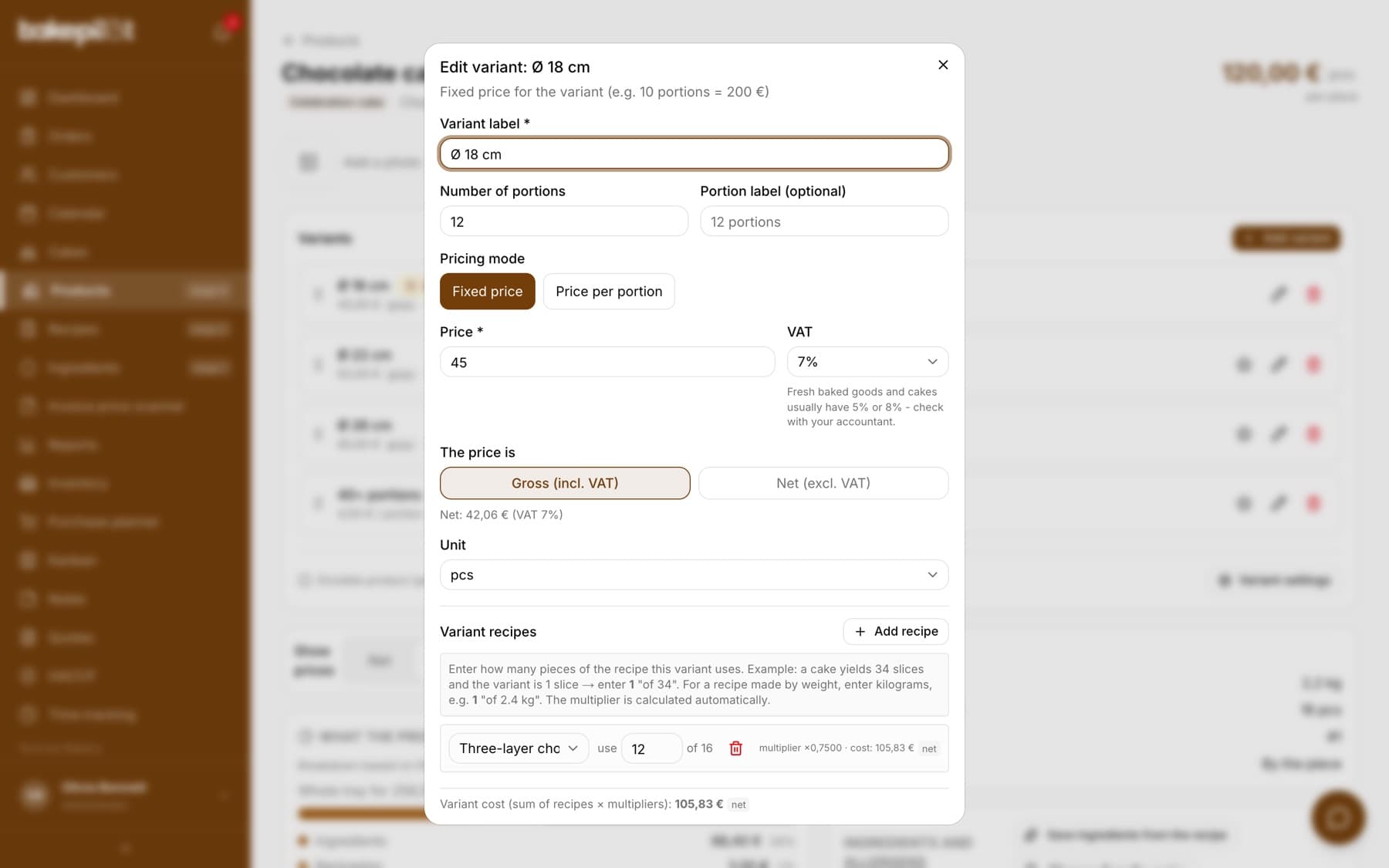
Path A: large cakes priced per serving
For wedding and First Communion cakes, add a variant in “Price per portion” mode: label “40+ servings (made to order)”, price per portion 14 PLN gross, unit portion, recipe “use 1 of 16” (usage per portion). Under the price field a green hint appears: “Suggested price: 18.47 PLN gross” - the price per portion calculated from the portion cost (6.84 PLN net) plus the 150% markup and 8% VAT. Click it to insert it into the field, or keep your own price. When taking an order, the salesperson enters the number of portions, and the price and cost are multiplied automatically.
Tip: The servings calculator by diameter (the table by Marta Mężyńska, a Polish pastry chef) is in the Cakes tab. The order wizard suggests the same numbers, so with “40+ servings” you can quickly work out the diameter and the number of tiers.
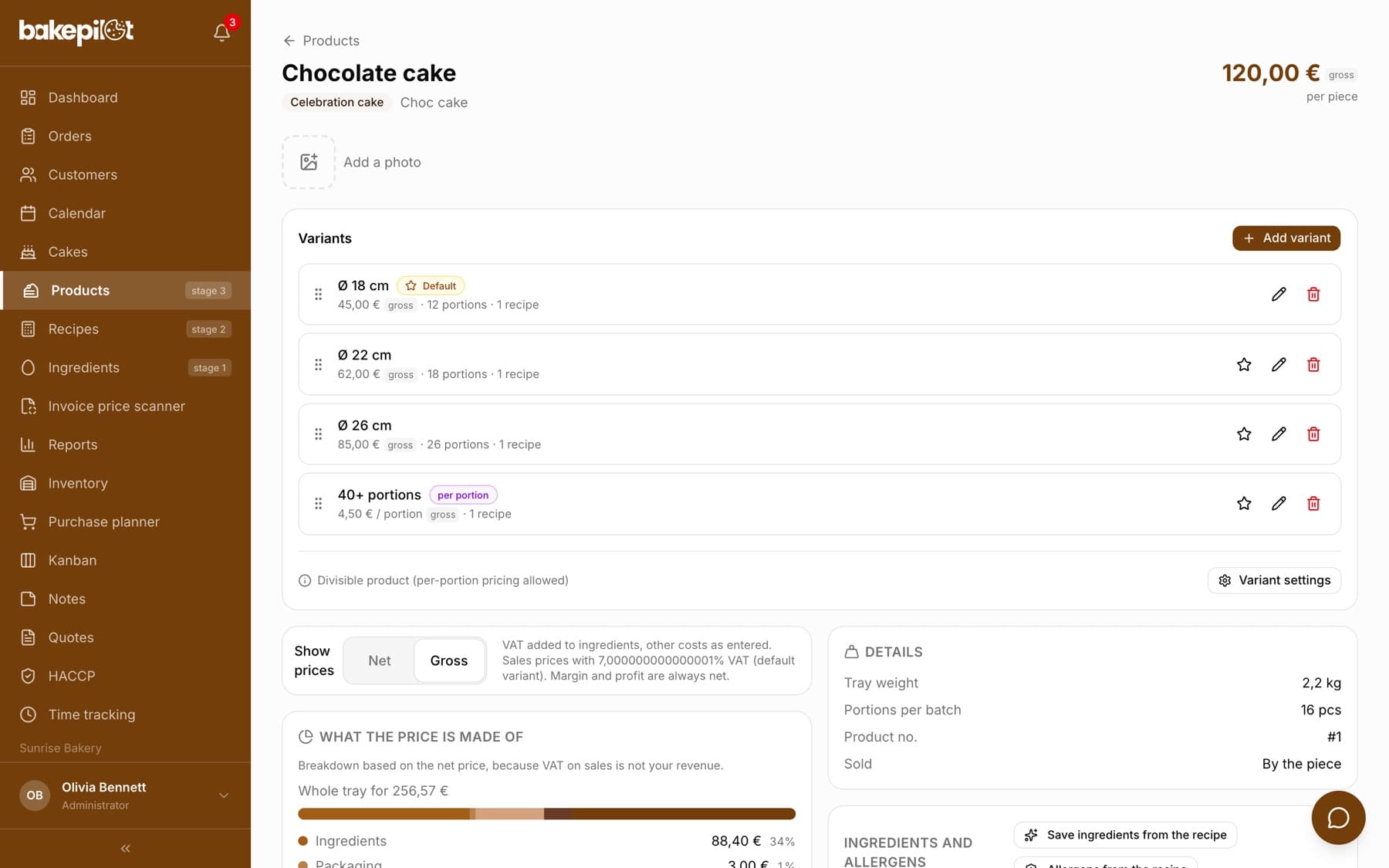
Path A: what you see on the product card
The list of variants with prices and the number of recipes, below it the recipe cost breakdown (food cost 73.92 PLN, total cost 109.49 PLN, food cost % 38.0%) and pricing from a 62% margin (retail price per kg 102.90 PLN, margin per tray 178.64 PLN, fraction tiles, profit per variant, B2B simulator). You see the cost of a specific size in its variant window.
Path B: the cake configurator
Go to the Cakes tab (Profesjonalny (Professional) plan and higher, administrator only). Create a template, for example “Cakes”, and in it cake types with a pricing mode: per kg, per portion or both, chosen when ordering. For a type, enter the price per kg (for example 120 PLN), the price per portion (14 PLN) and how many portions a kilogram yields (8) - the system checks that these numbers are consistent. Add shapes with a weight per person (round 150 g) and option groups, for example “Cream” with a single choice and surcharges.
- Cakes, enter the template name, “Create template”.
- “Add cake type”: name and price per kg. Then click the type and set the “Pricing mode” and portions per kilogram, “Save pricing mode”.
- “Add shape”: round, rectangular, square or heart and the weight per person.
- “Add option group”: name, type Single or Multiple, and in the group the options with surcharges.
- Products, Add: for example “Custom order cake”, tick “Custom product (cake configurator)”.
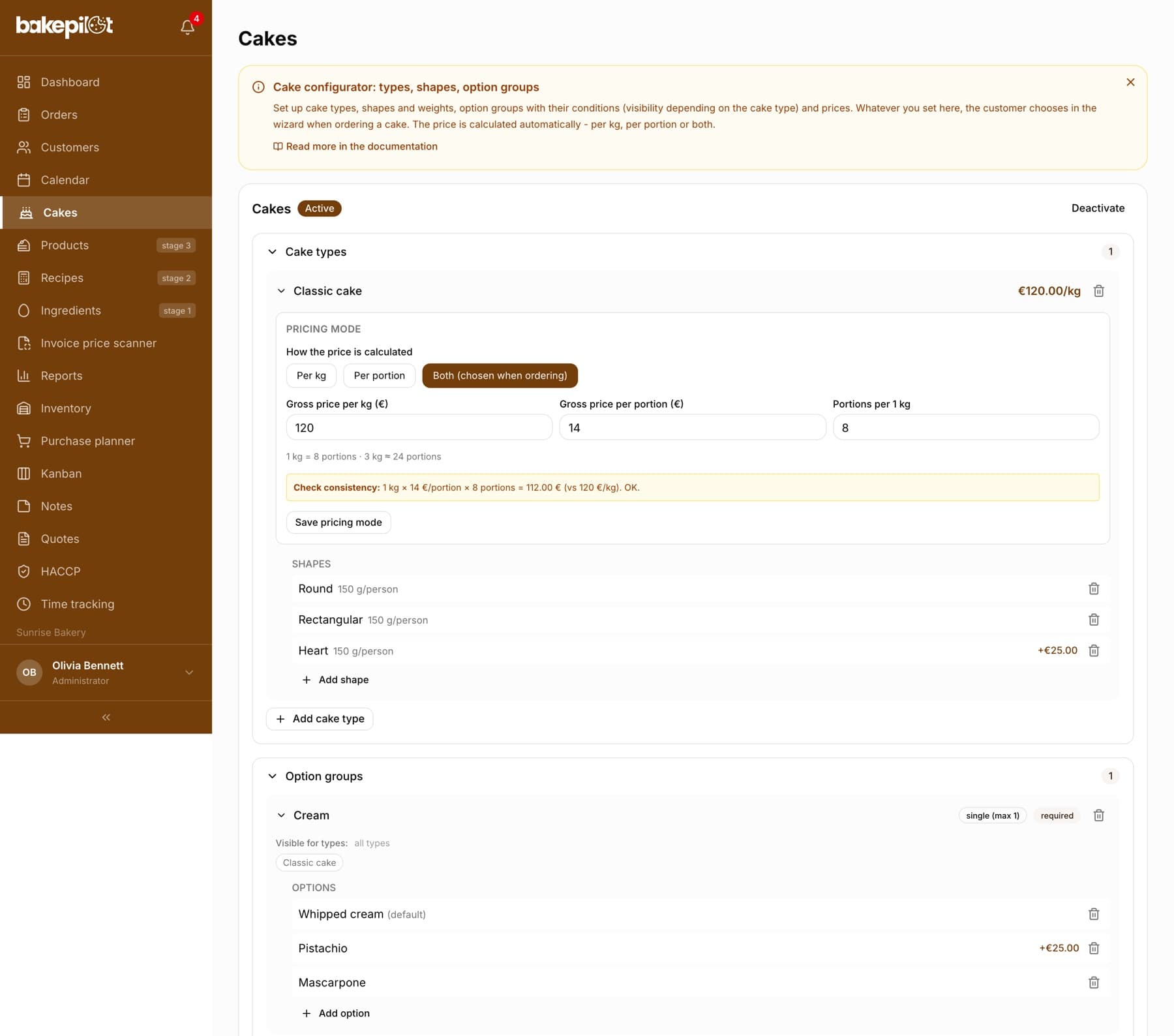
Tip: The configurator calculates the price from the options, not from a recipe. It does not show food cost or margin - if you want to know them for typical cakes, keep those as products with variants in parallel (path A).
Path B: what the order looks like
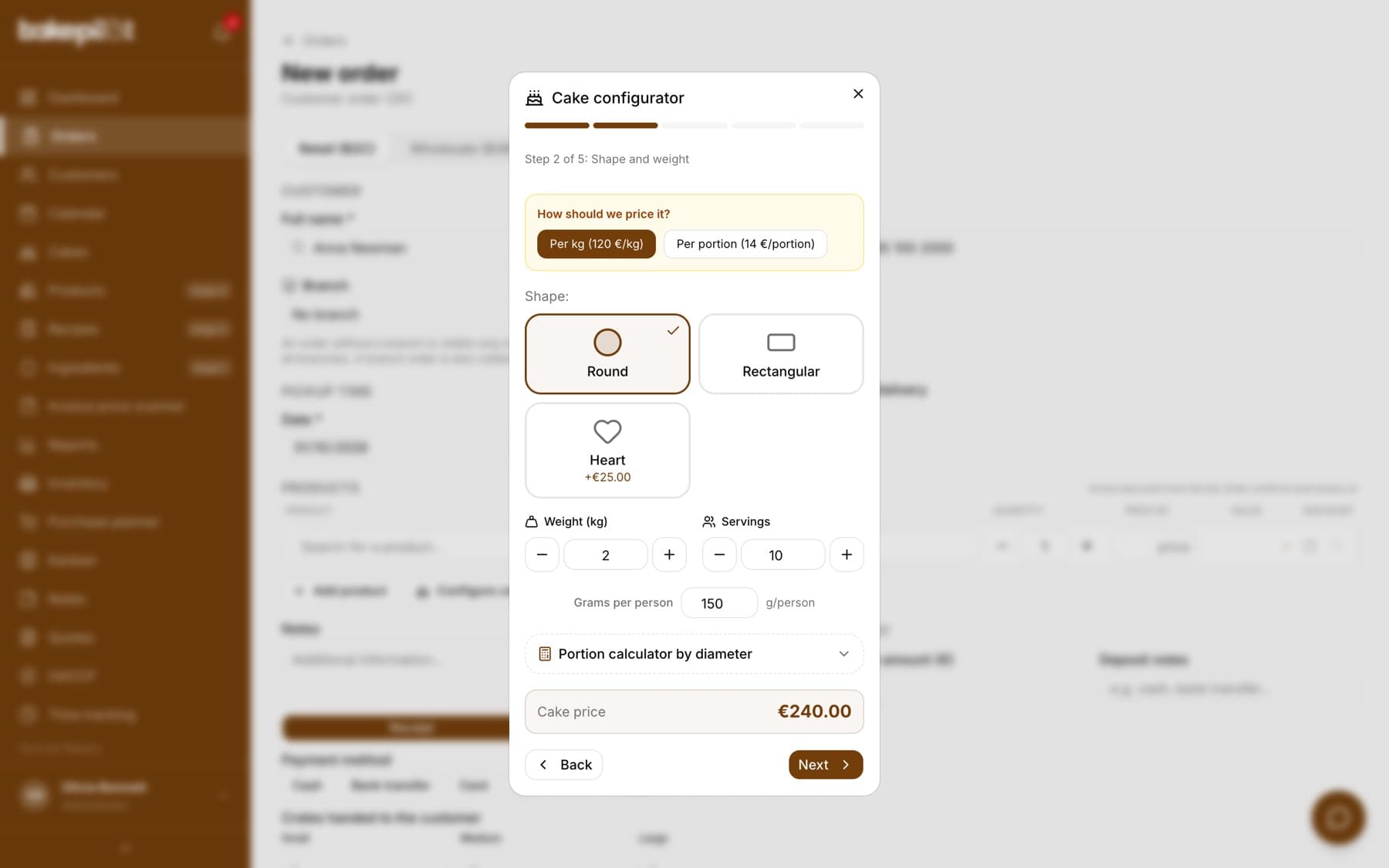
In a new order, click “Configure cake” under the product list (the button appears when you have an active template in the Cakes tab). The “Cake configurator” wizard opens with the steps: cake type, shape and weight (or the number of portions, if the type uses per-portion or both modes), option groups, inscription, summary. The “Cake price” is visible at the bottom all the time. The “Add to order” button inserts the cake with a full description of the chosen options.
Frequently asked questions
Can a cake have variants and be configurable at the same time?
No. The “Custom product” checkbox turns off variants for this product. Create two products: one with variants, the other configurable.
The “Price per portion” variant is grayed out. Why?
The product is not marked as divisible. Click “Variant settings” on the product card and tick “Divisible product (cake, tray bake)”.
Related articles
From ingredient to product - how BakePilot calculates cost and profit
Step-by-step guides
Advanced variants - several recipes, boxes, portions, B2B, allergens
Step-by-step guides
Cheesecake, apple pie, brownies - sheet cakes and slices
Step-by-step guides
Product variants
Products
Cake configurator - custom cake orders step by step
Products